> ## Documentation Index
> Fetch the complete documentation index at: https://powersync-attachment-transport.mintlify.site/llms.txt
> Use this file to discover all available pages before exploring further.
# Attachments / Files
> Sync file attachments like images and PDFs without storing them in the database, using an offline-first queue for uploads and downloads.
## Introduction
The `@powersync/attachments` package (JavaScript/TypeScript) and `powersync_attachments_helper` package (Flutter/Dart) are deprecated. Attachment functionality is now built-in to the PowerSync SDKs. Please use the [built-in attachment helpers](#sdk-%26-demo-reference) instead, and see the [migration notes](#migrating-from-deprecated-packages).
While PowerSync excels at syncing structured data, storing large files (images, videos, PDFs) directly in SQLite is not recommended. Embedding files as base64-encoded data or binary blobs in database rows can lead to many issues.
Instead, PowerSync uses a **metadata + storage provider pattern**: sync small metadata records through PowerSync while storing actual files in purpose-built storage systems (S3, Supabase Storage, Cloudflare R2, etc.). This approach provides:
* **Optimal performance** - Database stays small and fast
* **Automatic queue management** - Background uploads/downloads with retry logic
* **Offline-first support** - Local files available immediately, sync happens in background
* **Cache management** - Automatic cleanup of unused files
* **Platform flexibility** - Works across web, mobile, and desktop
## SDK & Demo Reference
We provide attachment helpers for multiple platforms:
| SDK | Package | Min. SDK version | Demo App |
| ------------------------- | ------------------------------------------------------------------------------------------------------------------------------------------------- | -------------------------------------------------- | ---------------------------------------------------------------------------------------------------------------- |
| **JavaScript/TypeScript** | [Built-in attachments (alpha)](https://github.com/powersync-ja/powersync-js/tree/main/packages/common/src/attachments) | Web v1.33.0, React Native v1.30.0, Node.js v0.17.0 | [React Native Todo](https://github.com/powersync-ja/powersync-js/tree/main/demos/react-native-supabase-todolist) |
| **Flutter** | [Built-in attachments (alpha)](https://pub.dev/documentation/powersync_core/latest/topics/attachments-topic.html) | v1.16.0 | [Flutter Todo](https://github.com/powersync-ja/powersync.dart/tree/main/demos/supabase-todolist) |
| **Swift** | [Built-in attachments (alpha)](https://github.com/powersync-ja/powersync-swift/blob/main/Sources/PowerSync/attachments/README.md) | v1.0.0 | [iOS Demo](https://github.com/powersync-ja/powersync-swift/tree/main/Demos/PowerSyncExample) |
| **Kotlin** | [Built-in attachments (alpha)](https://github.com/powersync-ja/powersync-kotlin/tree/main/common/src/commonMain/kotlin/com/powersync/attachments) | v1.0.0 | [Android Todo](https://github.com/powersync-ja/powersync-kotlin/tree/main/demos/android-supabase-todolist) |
| **.NET** | [Built-in attachments (alpha)](https://github.com/powersync-ja/powersync-dotnet/tree/main/PowerSync/PowerSync.Common/Attachments/README.md) | v0.1.2 | [MAUI Todo](https://github.com/powersync-ja/powersync-dotnet/tree/main/demos/MAUITodo) |
Most demo applications use Supabase Storage as the storage provider, but the patterns are adaptable to any storage system.
## How It Works
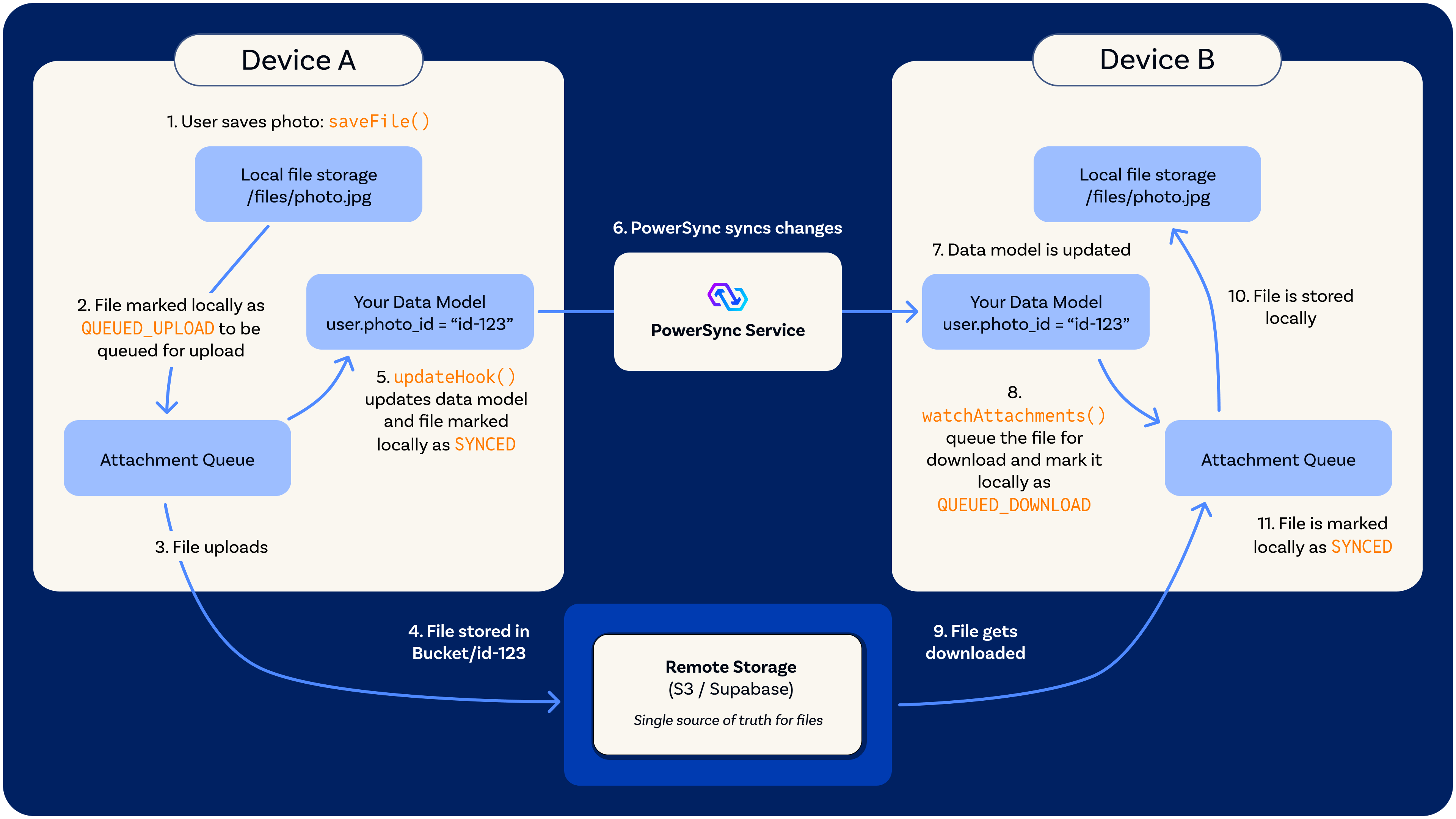 ### Workflow
1. **Save file** - Your app calls `saveFile()` with file data and an `updateHook` to handle linking the attachment to your data model
2. **Queue for upload** - File is saved locally and a record is created in the attachments table with state `QUEUED_UPLOAD`
3. **Background upload** - The attachment queue automatically uploads file to remote storage (S3/Supabase/etc.)
4. **Remote storage** - File is stored in remote storage with the attachment ID
5. **State update** - The `updateHook` runs, updating your data model with the attachment ID and marking the file locally as `SYNCED`
6. **Cross-device sync** - PowerSync syncs the data model changes to other clients
7. **Data model updated** - Other clients receive the updated data model with the new attachment reference (e.g., `user.photo_id = "id-123"`)
8. **Watch detects attachment** - Other clients' `watchAttachments()` callback detects the new attachment reference and creates a record in the attachments table with state `QUEUED_DOWNLOAD`
9. **File download** - The attachment queue automatically downloads the file from remote storage
10. **Local storage** - File is saved to local storage on the other client
11. **State update** - File is marked locally as `SYNCED` and ready for use
### Attachment States
| State | Description |
| ----------------- | ------------------------------------------------------------------ |
| `QUEUED_UPLOAD` | File saved locally, waiting to upload to remote storage |
| `QUEUED_DOWNLOAD` | Data model synced from another device, file needs to be downloaded |
| `SYNCED` | File exists both locally and in remote storage, fully synced |
| `QUEUED_DELETE` | Marked for deletion from both local and remote storage |
| `ARCHIVED` | No longer referenced in your data model, candidate for cleanup |
## Core Components
### Attachment Table
The **Attachment Table** is a local-only table that stores metadata about each file. It's not synced through PowerSync's Sync Streams/Rules - instead, it's managed entirely by the attachment queue on each device.
**Metadata stored:**
* `id` - Unique attachment identifier (UUID)
* `filename` - File name with extension (e.g., `photo-123.jpg`)
* `localUri` - Reference to the file in local storage. The format is platform-specific: a file path on native platforms and Node.js, or an internal `indexeddb://` reference on web
* `size` - File size in bytes
* `mediaType` - MIME type (e.g., `image/jpeg`)
* `state` - Current sync state (see states above)
* `hasSynced` - Boolean indicating if file has ever been uploaded
* `timestamp` - Last update time
* `metaData` - Optional JSON string for custom data
**Key characteristics:**
* **Local-only** - Each device maintains its own attachment table
* **Automatic management** - Queue handles all inserts/updates
* **Cross-client coordination** - Your data model (e.g., `users.photo_id`) tells each client which files it needs
### Remote Storage Adapter
The **Remote Storage Adapter** is an interface you implement to connect PowerSync with your cloud storage provider. It's completely platform-agnostic - Implementations can use S3, Supabase Storage, Cloudflare R2, Azure Blob, or even IPFS.
**Interface methods:**
* `uploadFile(fileData, attachment)` - Upload file to cloud storage
* `downloadFile(attachment)` - Download file from cloud storage
* `deleteFile(attachment)` - Delete file from cloud storage
In the JavaScript/TypeScript SDK, this adapter backs the default [attachment transport](#attachment-transport), which delegates upload, download, and delete to it. A queue configured with a `transportAdapter` instead does not use a remote storage adapter at all.
**Common pattern:**
For security reasons, client-side implementations should use **signed URLs**
1. Request a signed upload/download URL from your backend
2. Your backend validates permissions and generates a temporary URL
3. Client uploads/downloads directly to storage using the signed URL
4. Never expose storage credentials to clients
### Local Storage Adapter
The **Local Storage Adapter** handles file persistence on the device. PowerSync provides implementations for common platforms and allows you to create custom adapters.
**Interface methods:**
* `initialize()` - Set up storage (create directories, etc.)
* `saveFile(path, data)` - Write file to storage
* `readFile(path)` - Read file from storage
* `deleteFile(path)` - Remove file from storage
* `fileExists(path)` - Check if file exists
* `getLocalUri(filename)` - Get full path for a filename
In the JavaScript/TypeScript SDK, adapters that can relocate a file without loading it into memory implement the `StreamingLocalStorageAdapter` subinterface, which adds `moveFile(sourceUri, targetUri)`. Configuring the queue with a streaming-capable adapter enables [`saveFileFromUri`](#upload-an-attachment). The Node.js, Expo, and React Native FS adapters are streaming-capable; the web IndexedDB adapter is not.
**Built-in adapters:**
* **IndexedDB** - For web browsers (`IndexDBFileSystemStorageAdapter`)
* **Node.js Filesystem** - For Node/Electron (`NodeFileSystemAdapter`)
* **React Native** - For React Native with Expo or bare React Native we have a dedicated package [(`@powersync/attachments-storage-react-native`)](https://github.com/powersync-ja/powersync-js/tree/main/packages/attachments-storage-react-native)
* **Native mobile storage** - For Flutter, Kotlin, Swift
The React Native local storage adapter requires Expo 54 or later. The Expo streaming transport requires Expo 56 or later.
### Attachment Transport
The **Attachment Transport** owns all remote operations for an attachment: upload, download, and delete. It is available in the JavaScript/TypeScript SDK only.
By default, the queue wraps your remote storage adapter in an internal buffered transport. It reads the entire file into JS memory as an `ArrayBuffer` before handing it to the remote storage adapter, and the reverse for downloads. This works well for small files, but large files can cause memory pressure, particularly in React Native on lower-end devices.
To avoid this, pass an `AttachmentTransportAdapter` in the queue's `transportAdapter` option. A transport implements three methods:
* `upload(attachment)` - Transfer the file at `attachment.localUri` to remote storage
* `download(attachment)` - Fetch the remote file into `attachment.localUri` (the queue assigns the destination path before the call)
* `delete(attachment)` - Remove the file from remote storage
Because a transport owns the entire transfer, it can stream bytes natively between the file on disk and the network without materializing them in the JS heap. PowerSync provides streaming transports for Node.js and React Native, created from their local storage adapters with `createTransportAdapter`; see [Transferring Large Files Without Buffering](#transferring-large-files-without-buffering).
You can configure the queue with either a `remoteStorage` or a `transportAdapter`, but not both. Supplying both, or neither, is a TypeScript compile-time error. A queue configured with a `transportAdapter` handles all remote operations through it and does not use a remote storage adapter.
The transport API requires `@powersync/web` v3.0.0, `@powersync/react-native` v2.0.3, or `@powersync/node` v0.21.0 or later. React Native also requires `@powersync/attachments-storage-react-native` v0.1.0 or later.
### Attachment Queue
The **Attachment Queue** is the orchestrator that manages the entire attachment lifecycle. It:
* **Watches your data model** - You pass a `watchAttachments` function as a parameter that monitors which files your app references
* **Manages state transitions** - Automatically moves files through states (upload/download → synced → archive → delete)
* **Handles retries** - Failed operations are retried on the next sync interval
* **Performs cleanup** - Removes archived files that are no longer needed
* **Verifies integrity** - Checks local files exist and repairs inconsistencies
**Watched Attachments pattern:**
The queue needs to know which attachments exist in your data model. The `watchAttachments` function you provide monitors your data model and returns a list of attachment IDs that your app references. The queue compares this list with its internal attachment table to determine:
* **New attachments** - Download them
* **Missing attachments** - Upload them
* **Removed attachments** - Archive them
The `watchAttachments` queries are reactive and execute whenever the watched tables change, keeping the attachment queue in sync with your data model.
There are a few scenarios you might encounter:
**Single Attachment Type**
For a single attachment type, you watch one table. For example, if users have profile photos:
```sql theme={null}
SELECT photo_id FROM users WHERE photo_id IS NOT NULL
```
**Multiple Attachment Types - Single Queue**
You can watch multiple attachment types using a single queue by combining queries with SQL `UNION` or `UNION ALL`. This allows you to monitor attachments across different tables (e.g., `users.photo_id`, `documents.document_id`, `videos.video_id`) in one queue. Each attachment type may have different file extensions, which can be handled in the query by selecting the extension from your data model or using type-specific defaults.
For example:
```sql theme={null}
SELECT photo_id as id, photo_file_extension as file_extension
FROM users
WHERE photo_id IS NOT NULL
UNION ALL
SELECT document_id as id, document_file_extension as file_extension
FROM documents
WHERE document_id IS NOT NULL
UNION ALL
SELECT video_id as id, video_file_extension as file_extension
FROM videos
WHERE video_id IS NOT NULL
```
Use `UNION ALL` when you want to include all rows (including duplicates), or `UNION` when you want to automatically deduplicate results. For attachment watching, `UNION ALL` is typically preferred since attachment IDs should already be unique.
The UNION query executes whenever any of the watched tables change, which may have higher database overhead compared to watching a single table. Implementation examples are shown in the [Initialize Attachment Queue](#initialize-attachment-queue) section below.
**Multiple Attachment Types - Multiple Queues**
Alternatively, you can create separate queues for different attachment types. Each queue watches its own specific table(s) with simpler queries, allowing for independent configuration and management.
Multiple queues may use more memory, but each queue watches simpler queries. Implementation examples are shown in the [Initialize Attachment Queue](#initialize-attachment-queue) section below.
## Implementation Guide
### Installation
```bash JavaScript/TypeScript theme={null}
# Built into @powersync/web, @powersync/node, and @powersync/react-native.
# React Native requires an additional storage adapter:
# npm install @powersync/attachments-storage-react-native
# Expo projects (v54+) also require:
# npm install expo-file-system
# Bare React Native projects also require:
# npm install @dr.pogodin/react-native-fs
```
```bash Dart/Flutter theme={null}
# Built into the powersync package (v1.16.0+). No additional installation needed.
```
```swift Swift theme={null}
// Built into the PowerSync Swift SDK (v1.0.0+). No additional installation needed.
```
```kotlin Kotlin theme={null}
// Built into the PowerSync Kotlin SDK (v1.0.0+). No additional installation needed.
```
```bash .NET theme={null}
# Built into PowerSync.Common (v0.1.2+). No additional installation needed.
```
### Setup: Add Attachment Table to Schema
```typescript JavaScript/TypeScript theme={null}
import { Schema, Table, column, AttachmentTable } from '@powersync/web';
const appSchema = new Schema({
users: new Table({
name: column.text,
email: column.text,
photo_id: column.text // References attachment ID
}),
// Add the attachment table
attachments: new AttachmentTable()
});
```
```dart Flutter theme={null}
import 'package:powersync/powersync.dart';
import 'package:powersync_core/attachments/attachments.dart';
final schema = Schema([
Table('users', [
Column.text('name'),
Column.text('email'),
Column.text('photo_id'), // References attachment ID
]),
AttachmentsQueueTable(),
]);
```
```swift Swift theme={null}
import PowerSync
let users = Table(
name: "users",
columns: [
Column.text("name"),
Column.text("email"),
Column.text("photo_id"), // References attachment ID
]
)
let schema = Schema(
tables: [
users,
// Add the local-only table which stores attachment states
createAttachmentTable(name: "attachments")
]
)
```
```kotlin Kotlin theme={null}
import com.powersync.attachments.createAttachmentsTable
import com.powersync.db.schema.Column
import com.powersync.db.schema.Schema
import com.powersync.db.schema.Table
val users = Table(
name = "users",
columns = listOf(
Column.text("name"),
Column.text("email"),
Column.text("photo_id") // References attachment ID
)
)
val schema = Schema(
users,
// Add the local-only table which stores attachment states
createAttachmentsTable("attachments")
)
```
```csharp .NET theme={null}
using PowerSync.Common.Attachments;
using PowerSync.Common.DB.Schema;
var users = new Table(
"users",
new Dictionary
{
["name"] = ColumnType.Text,
["email"] = ColumnType.Text,
["photo_id"] = ColumnType.Text, // References attachment ID
});
// new Table(typeof(Attachment)) uses the [Table("attachments", LocalOnly = true)] attribute
var schema = new Schema(users, new Table(typeof(Attachment)));
```
### Configure Storage Adapters
```typescript JavaScript/TypeScript theme={null}
// For web browsers (IndexedDB)
import { IndexDBFileSystemStorageAdapter } from '@powersync/web';
const localStorage = new IndexDBFileSystemStorageAdapter('my-app-files');
// For Node.js/Electron (filesystem)
// import { NodeFileSystemAdapter } from '@powersync/node';
// const localStorage = new NodeFileSystemAdapter('./user-attachments');
// For React Native (Expo or bare React Native)
// Need to install @powersync/attachments-storage-react-native
//
// For Expo projects, also install expo-file-system
// import { ExpoFileSystemStorageAdapter } from '@powersync/attachments-storage-react-native';
// const localStorage = new ExpoFileSystemStorageAdapter();
//
// For bare React Native, also install @dr.pogodin/react-native-fs
// import { ReactNativeFileSystemStorageAdapter } from '@powersync/attachments-storage-react-native';
// const localStorage = new ReactNativeFileSystemStorageAdapter();
// Remote storage adapter (example with signed URLs)
const remoteStorage = {
async uploadFile(fileData: ArrayBuffer, attachment: AttachmentRecord) {
// Request signed upload URL from your backend
const { uploadUrl } = await fetch('/api/attachments/upload-url', {
method: 'POST',
headers: { 'Content-Type': 'application/json' },
body: JSON.stringify({
filename: attachment.filename,
contentType: attachment.mediaType
})
}).then(r => r.json());
// Upload to cloud storage using signed URL
await fetch(uploadUrl, {
method: 'PUT',
body: fileData,
headers: {
'Content-Type': attachment.mediaType || 'application/octet-stream'
}
});
},
async downloadFile(attachment: AttachmentRecord): Promise {
// Request signed download URL from your backend
const { downloadUrl } = await fetch(
`/api/attachments/${attachment.id}/download-url`
).then(r => r.json());
// Download from cloud storage
const response = await fetch(downloadUrl);
return response.arrayBuffer();
},
async deleteFile(attachment: AttachmentRecord) {
// Delete via your backend
await fetch(`/api/attachments/${attachment.id}`, {
method: 'DELETE'
});
}
};
// Optional (React Native and Node.js): a streaming transport for large files.
// It streams bytes directly between disk and network and owns
// upload/download/delete; configure it in place of remoteStorage.
// Created from the Expo, React Native FS, or Node.js local storage adapter.
// See "Transferring Large Files Without Buffering" below for a full example.
//
// const transportAdapter = localStorage.createTransportAdapter({
// resolveUpload: async (attachment) => ({
// url: await getSignedUploadUrl(attachment.filename)
// }),
// resolveDownload: async (attachment) => ({
// url: await getSignedDownloadUrl(attachment.filename)
// }),
// deleteFile: async (attachment) => {
// await deleteFromStorage(attachment.filename);
// }
// });
```
```dart Flutter theme={null}
import 'dart:io';
import 'dart:typed_data';
import 'package:path_provider/path_provider.dart';
import 'package:powersync_core/attachments/attachments.dart';
import 'package:powersync_core/attachments/io.dart';
import 'package:http/http.dart' as http;
// For Flutter (native platforms)
Future getLocalStorage() async {
final appDocDir = await getApplicationDocumentsDirectory();
final attachmentsDir = Directory('${appDocDir.path}/attachments');
return IOLocalStorage(attachmentsDir);
}
// Remote storage adapter (example with signed URLs)
class SignedUrlStorageAdapter implements RemoteStorage {
@override
Future uploadFile(
Stream> fileData,
Attachment attachment,
) async {
// Request signed upload URL from your backend
final response = await http.post(
Uri.parse('/api/attachments/upload-url'),
headers: {'Content-Type': 'application/json'},
body: jsonEncode({
'filename': attachment.filename,
'contentType': attachment.mediaType,
}),
);
final uploadUrl = jsonDecode(response.body)['uploadUrl'] as String;
// Collect stream data
final bytes = [];
await for (final chunk in fileData) {
bytes.addAll(chunk);
}
// Upload to cloud storage using signed URL
await http.put(
Uri.parse(uploadUrl),
body: Uint8List.fromList(bytes),
headers: {
'Content-Type': attachment.mediaType ?? 'application/octet-stream',
},
);
}
@override
Future>> downloadFile(Attachment attachment) async {
// Request signed download URL from your backend
final response = await http.get(
Uri.parse('/api/attachments/${attachment.id}/download-url'),
);
final downloadUrl = jsonDecode(response.body)['downloadUrl'] as String;
// Download from cloud storage
final httpResponse = await http.get(Uri.parse(downloadUrl));
return Stream.value(httpResponse.bodyBytes);
}
@override
Future deleteFile(Attachment attachment) async {
// Delete via your backend
await http.delete(
Uri.parse('/api/attachments/${attachment.id}'),
);
}
}
```
```swift Swift theme={null}
import Foundation
import PowerSync
// For iOS/macOS (FileManager)
func getAttachmentsDirectoryPath() throws -> String {
guard let documentsURL = FileManager.default.urls(
for: .documentDirectory,
in: .userDomainMask
).first else {
throw PowerSyncAttachmentError.attachmentError("Could not determine attachments directory path")
}
return documentsURL.appendingPathComponent("attachments").path
}
let localStorage = FileManagerStorageAdapter()
// Remote storage adapter (example with signed URLs)
class SignedUrlStorageAdapter: RemoteStorageAdapter {
func uploadFile(fileData: Data, attachment: Attachment) async throws {
// Request signed upload URL from your backend
struct UploadUrlResponse: Codable {
let uploadUrl: String
}
let requestBody = [
"filename": attachment.filename,
"contentType": attachment.mediaType ?? "application/octet-stream"
]
var request = URLRequest(url: URL(string: "/api/attachments/upload-url")!)
request.httpMethod = "POST"
request.setValue("application/json", forHTTPHeaderField: "Content-Type")
request.httpBody = try JSONSerialization.data(withJSONObject: requestBody)
let (data, _) = try await URLSession.shared.data(for: request)
let response = try JSONDecoder().decode(UploadUrlResponse.self, from: data)
// Upload to cloud storage using signed URL
var uploadRequest = URLRequest(url: URL(string: response.uploadUrl)!)
uploadRequest.httpMethod = "PUT"
uploadRequest.setValue(attachment.mediaType ?? "application/octet-stream", forHTTPHeaderField: "Content-Type")
uploadRequest.httpBody = fileData
let (_, uploadResponse) = try await URLSession.shared.data(for: uploadRequest)
guard let httpResponse = uploadResponse as? HTTPURLResponse,
(200...299).contains(httpResponse.statusCode) else {
throw PowerSyncAttachmentError.generalError("Upload failed")
}
}
func downloadFile(attachment: Attachment) async throws -> Data {
// Request signed download URL from your backend
struct DownloadUrlResponse: Codable {
let downloadUrl: String
}
let request = URLRequest(url: URL(string: "/api/attachments/\(attachment.id)/download-url")!)
let (data, _) = try await URLSession.shared.data(for: request)
let response = try JSONDecoder().decode(DownloadUrlResponse.self, from: data)
// Download from cloud storage
let downloadRequest = URLRequest(url: URL(string: response.downloadUrl)!)
let (fileData, _) = try await URLSession.shared.data(for: downloadRequest)
return fileData
}
func deleteFile(attachment: Attachment) async throws {
// Delete via your backend
var request = URLRequest(url: URL(string: "/api/attachments/\(attachment.id)")!)
request.httpMethod = "DELETE"
let (_, response) = try await URLSession.shared.data(for: request)
guard let httpResponse = response as? HTTPURLResponse,
(200...299).contains(httpResponse.statusCode) else {
throw PowerSyncAttachmentError.generalError("Delete failed")
}
}
}
let remoteStorage = SignedUrlStorageAdapter()
```
```kotlin Kotlin theme={null}
import com.powersync.attachments.LocalStorage
import com.powersync.attachments.RemoteStorage
import com.powersync.attachments.Attachment
import com.powersync.attachments.storage.IOLocalStorageAdapter
import kotlinx.coroutines.flow.Flow
import kotlinx.coroutines.flow.flowOf
import kotlinx.io.files.Path
// For local storage (uses IOLocalStorageAdapter by default)
// On Android: "${applicationContext.filesDir.canonicalPath}/attachments"
val attachmentsDirectory = Path("attachments").toString()
val localStorage: LocalStorage = IOLocalStorageAdapter()
// Remote storage adapter (example with signed URLs)
val remoteStorage = object : RemoteStorage {
override suspend fun uploadFile(
fileData: Flow,
attachment: Attachment
) {
// Request signed upload URL from your backend
val uploadUrl = // ... fetch from your API
// Upload to cloud storage using signed URL
// Collect the flow and upload
val bytes = mutableListOf()
fileData.collect { bytes.add(it) }
val allBytes = bytes.flatMap { it.toList() }.toByteArray()
// Upload allBytes to uploadUrl
// ... your HTTP upload implementation
}
override suspend fun downloadFile(attachment: Attachment): Flow {
// Request signed download URL from your backend
val downloadUrl = // ... fetch from your API
// Download from cloud storage
val response = // ... your HTTP download implementation
return flowOf(response) // or convert your ByteArray to Flow
}
override suspend fun deleteFile(attachment: Attachment) {
// Delete via your backend
// ... your HTTP delete implementation
}
}
```
```csharp .NET theme={null}
using PowerSync.Common.Attachments;
// Local storage backed by System.IO.File — works on Windows, macOS, Linux, iOS, and Android
var localStorage = new FileManagerLocalStorage(
Path.Combine(Environment.GetFolderPath(Environment.SpecialFolder.ApplicationData), "myapp", "attachments"));
// Remote storage adapter (example with signed URLs)
public sealed class MyRemoteStorage(HttpClient http) : IRemoteStorageAdapter
{
public async Task UploadFileAsync(Stream fileData, Attachment attachment)
{
// Request a signed upload URL from your backend
var resp = await http.PostAsJsonAsync("/api/attachments/upload-url",
new { filename = attachment.Filename });
var body = await resp.Content.ReadFromJsonAsync()
?? throw new InvalidOperationException("missing body");
// Upload directly to cloud storage using the signed URL
using var content = new StreamContent(fileData);
content.Headers.ContentType = new(attachment.MediaType ?? "application/octet-stream");
(await http.PutAsync(body.UploadUrl, content)).EnsureSuccessStatusCode();
}
public async Task DownloadFileAsync(Attachment attachment)
{
// Request a signed download URL from your backend
var url = await http.GetStringAsync($"/api/attachments/download-url/{attachment.Id}");
return await http.GetStreamAsync(url);
}
public async Task DeleteFileAsync(Attachment attachment)
{
// Delete via your backend; 404 is treated as success (file already gone)
var resp = await http.DeleteAsync($"/api/attachments/{attachment.Id}");
if (resp.StatusCode != HttpStatusCode.NotFound)
resp.EnsureSuccessStatusCode();
}
private sealed record UploadUrlResponse(string UploadUrl);
}
```
**Security Best Practice:** Always use your backend to generate signed URLs and validate permissions. Never expose storage credentials directly to clients.
### Initialize Attachment Queue
```typescript JavaScript/TypeScript theme={null}
import { AttachmentQueue } from '@powersync/web';
const attachmentQueue = new AttachmentQueue({
db: db, // PowerSync database instance
localStorage,
remoteStorage,
// Or a transportAdapter in place of remoteStorage (provide exactly one);
// it owns all remote operations. See "Attachment Transport" above.
// transportAdapter,
// Define which attachments exist in your data model
watchAttachments: (onUpdate) => {
db.watch(
`SELECT photo_id FROM users WHERE photo_id IS NOT NULL`,
[],
{
onResult: async (result) => {
const attachments = result.rows?._array.map(row => ({
id: row.photo_id,
// Names the file in local storage (.jpg). Either fileExtension or filename is required
fileExtension: 'jpg',
// MIME type for remote transfer (the Content-Type). Optional, never inferred
// from fileExtension, and preserved on the downloaded record (JS SDK only)
mediaType: 'image/jpeg'
})) ?? [];
await onUpdate(attachments);
}
}
);
},
// Optional configuration
syncIntervalMs: 30000, // Sync every 30 seconds
downloadAttachments: true, // Auto-download referenced files
archivedCacheLimit: 100 // Keep 100 archived files before cleanup
});
// Start the sync process
await attachmentQueue.startSync();
```
```dart Flutter theme={null}
import 'package:logging/logging.dart';
import 'package:powersync/powersync.dart';
import 'package:powersync_core/attachments/attachments.dart';
final logger = Logger('AttachmentQueue');
late AttachmentQueue attachmentQueue;
Future initializeAttachmentQueue(PowerSyncDatabase db) async {
attachmentQueue = AttachmentQueue(
db: db,
remoteStorage: SignedUrlStorageAdapter(),
localStorage: await getLocalStorage(),
// Define which attachments exist in your data model
watchAttachments: () => db.watch('''
SELECT photo_id as id
FROM users
WHERE photo_id IS NOT NULL
''').map(
(results) => [
for (final row in results)
WatchedAttachmentItem(
id: row['id'] as String,
fileExtension: 'jpg',
)
],
),
// Optional configuration
syncInterval: const Duration(seconds: 30), // Sync every 30 seconds
downloadAttachments: true, // Auto-download referenced files
archivedCacheLimit: 100, // Keep 100 archived files before cleanup
logger: logger,
);
// Start the sync process
await attachmentQueue.startSync();
}
```
```swift Swift theme={null}
let attachmentQueue = AttachmentQueue(
db: db, // PowerSync database instance
remoteStorage: remoteStorage,
attachmentsDirectory: try getAttachmentsDirectoryPath(),
// Define which attachments exist in your data model
watchAttachments: {
try db.watch(
sql: """
SELECT photo_id
FROM users
WHERE photo_id IS NOT NULL
""",
parameters: [],
mapper: { cursor in
try WatchedAttachmentItem(
id: cursor.getString(name: "photo_id"),
fileExtension: "jpg"
)
}
)
},
// Optional configuration
syncInterval: 30.0, // Sync every 30 seconds
downloadAttachments: true, // Auto-download referenced files
archivedCacheLimit: 100 // Keep 100 archived files before cleanup
)
// Start the sync process
try await attachmentQueue.startSync()
```
```kotlin Kotlin theme={null}
import com.powersync.attachments.AttachmentQueue
import com.powersync.attachments.WatchedAttachmentItem
import com.powersync.db.getString
import kotlinx.coroutines.flow.Flow
import kotlin.time.Duration.Companion.seconds
val attachmentQueue = AttachmentQueue(
db = db, // PowerSync database instance
remoteStorage = remoteStorage,
attachmentsDirectory = attachmentsDirectory,
localStorage = localStorage, // Optional, defaults to IOLocalStorageAdapter()
// Define which attachments exist in your data model
watchAttachments = {
db.watch(
sql = """
SELECT photo_id
FROM users
WHERE photo_id IS NOT NULL
""",
parameters = null
) { cursor ->
WatchedAttachmentItem(
id = cursor.getString("photo_id"),
fileExtension = "jpg"
)
}
},
// Optional configuration
syncInterval = 30.seconds, // Sync every 30 seconds
downloadAttachments = true, // Auto-download referenced files
archivedCacheLimit = 100 // Keep 100 archived files before cleanup
)
// Start the sync process
attachmentQueue.startSync()
```
```csharp .NET theme={null}
using PowerSync.Common.Attachments;
var queue = new AttachmentQueue(new AttachmentQueueOptions
{
Db = powersync,
LocalStorage = localStorage,
RemoteStorage = remoteStorage,
// Define which attachments exist in your data model
WatchAttachments = ct => WatchProfilePhotos(powersync, ct),
// Optional configuration
SyncInterval = TimeSpan.FromSeconds(30), // Retry failed transfers every 30 seconds
DownloadAttachments = true, // Auto-download referenced files
ArchivedCacheLimit = 100, // Keep 100 archived files before cleanup
});
// Start automatic syncing
await queue.StartSyncAsync();
static async IAsyncEnumerable WatchProfilePhotos(
PowerSyncDatabase db,
[EnumeratorCancellation] CancellationToken ct)
{
var stream = db.Watch(
"SELECT photo_id FROM users WHERE photo_id IS NOT NULL",
null,
new SQLWatchOptions { TriggerImmediately = true, Signal = ct });
await foreach (var rows in stream.WithCancellation(ct))
yield return [.. rows.Select(r => new WatchedAttachmentItem(r.photo_id, fileExtension: "jpg"))];
}
internal sealed class UserPhotoRow { public string photo_id { get; set; } = ""; }
```
The `watchAttachments` callback is crucial - it tells the queue which files your app needs based on your data model. The queue uses this to automatically download, upload, or archive files.
#### Watching Multiple Attachment Types
When watching multiple attachment types, you need to provide the `fileExtension` for each attachment. You can store this in your data model tables or derive it from other fields. Here are examples for both patterns:
**Pattern 2: Single Queue with UNION**
```typescript JavaScript/TypeScript theme={null}
// Example: Watching users.photo_id, documents.document_id, and videos.video_id
// Assuming your tables store file extensions
const attachmentQueue = new AttachmentQueue({
db: db,
localStorage,
remoteStorage,
watchAttachments: (onUpdate) => {
db.watch(
`SELECT photo_id as id, photo_file_extension as file_extension
FROM users
WHERE photo_id IS NOT NULL
UNION ALL
SELECT document_id as id, document_file_extension as file_extension
FROM documents
WHERE document_id IS NOT NULL
UNION ALL
SELECT video_id as id, video_file_extension as file_extension
FROM videos
WHERE video_id IS NOT NULL`,
[],
{
onResult: async (result) => {
const attachments = result.rows?._array.map(row => ({
id: row.id,
fileExtension: row.file_extension
})) ?? [];
await onUpdate(attachments);
}
}
);
},
// ... other options
});
await attachmentQueue.startSync();
```
```dart Flutter theme={null}
// Example: Watching users.photo_id, documents.document_id, and videos.video_id
// Assuming your tables store file extensions
attachmentQueue = AttachmentQueue(
db: db,
remoteStorage: SignedUrlStorageAdapter(),
localStorage: await getLocalStorage(),
watchAttachments: () => db.watch('''
SELECT photo_id as id, photo_file_extension as file_extension
FROM users
WHERE photo_id IS NOT NULL
UNION ALL
SELECT document_id as id, document_file_extension as file_extension
FROM documents
WHERE document_id IS NOT NULL
UNION ALL
SELECT video_id as id, video_file_extension as file_extension
FROM videos
WHERE video_id IS NOT NULL
''').map(
(results) => [
for (final row in results)
WatchedAttachmentItem(
id: row['id'] as String,
fileExtension: row['file_extension'] as String,
)
],
),
// ... other options
);
await attachmentQueue.startSync();
```
```swift Swift theme={null}
// Example: Watching users.photo_id, documents.document_id, and videos.video_id
// Assuming your tables store file extensions
let attachmentQueue = AttachmentQueue(
db: db,
remoteStorage: remoteStorage,
attachmentsDirectory: try getAttachmentsDirectoryPath(),
watchAttachments: {
try db.watch(
sql: """
SELECT photo_id as id, photo_file_extension as file_extension
FROM users
WHERE photo_id IS NOT NULL
UNION ALL
SELECT document_id as id, document_file_extension as file_extension
FROM documents
WHERE document_id IS NOT NULL
UNION ALL
SELECT video_id as id, video_file_extension as file_extension
FROM videos
WHERE video_id IS NOT NULL
""",
parameters: [],
mapper: { cursor in
try WatchedAttachmentItem(
id: cursor.getString(name: "id"),
fileExtension: cursor.getString(name: "file_extension")
)
}
)
},
// ... other options
)
try await attachmentQueue.startSync()
```
```kotlin Kotlin theme={null}
// Example: Watching users.photo_id, documents.document_id, and videos.video_id
// Assuming your tables store file extensions
val attachmentQueue = AttachmentQueue(
db = db,
remoteStorage = remoteStorage,
attachmentsDirectory = attachmentsDirectory,
localStorage = localStorage,
watchAttachments = {
db.watch(
sql = """
SELECT photo_id as id, photo_file_extension as file_extension
FROM users
WHERE photo_id IS NOT NULL
UNION ALL
SELECT document_id as id, document_file_extension as file_extension
FROM documents
WHERE document_id IS NOT NULL
UNION ALL
SELECT video_id as id, video_file_extension as file_extension
FROM videos
WHERE video_id IS NOT NULL
""",
parameters = null
) { cursor ->
WatchedAttachmentItem(
id = cursor.getString("id"),
fileExtension = cursor.getString("file_extension")
)
}
},
// ... other options
)
attachmentQueue.startSync()
```
```csharp .NET theme={null}
// Example: watching users.photo_id, documents.document_id, and videos.video_id
// Assuming your tables store file extensions
var queue = new AttachmentQueue(new AttachmentQueueOptions
{
Db = powersync,
LocalStorage = localStorage,
RemoteStorage = remoteStorage,
WatchAttachments = ct => WatchAllAttachments(powersync, ct),
// ... other options
});
await queue.StartSyncAsync();
static async IAsyncEnumerable WatchAllAttachments(
PowerSyncDatabase db,
[EnumeratorCancellation] CancellationToken ct)
{
var stream = db.Watch(
"""
SELECT photo_id AS id, photo_file_extension AS file_extension
FROM users
WHERE photo_id IS NOT NULL
UNION ALL
SELECT document_id AS id, document_file_extension AS file_extension
FROM documents
WHERE document_id IS NOT NULL
UNION ALL
SELECT video_id AS id, video_file_extension AS file_extension
FROM videos
WHERE video_id IS NOT NULL
""",
null,
new SQLWatchOptions { TriggerImmediately = true, Signal = ct });
await foreach (var rows in stream.WithCancellation(ct))
yield return [.. rows.Select(r => new WatchedAttachmentItem(r.id, fileExtension: r.file_extension))];
}
internal sealed class AttachmentRef
{
public string id { get; set; } = "";
public string file_extension { get; set; } = "";
}
```
**Pattern 3: Multiple Queues**
```typescript JavaScript/TypeScript theme={null}
// Create separate queues for different attachment types
const photoQueue = new AttachmentQueue({
db: db,
localStorage,
remoteStorage,
watchAttachments: (onUpdate) => {
db.watch(
`SELECT photo_id FROM users WHERE photo_id IS NOT NULL`,
[],
{
onResult: async (result) => {
const attachments = result.rows?._array.map(row => ({
id: row.photo_id,
fileExtension: 'jpg',
mediaType: 'image/jpeg' // Optional: preserved on the downloaded record
})) ?? [];
await onUpdate(attachments);
}
}
);
},
});
const documentQueue = new AttachmentQueue({
db: db,
localStorage,
remoteStorage,
watchAttachments: (onUpdate) => {
db.watch(
`SELECT document_id FROM documents WHERE document_id IS NOT NULL`,
[],
{
onResult: async (result) => {
const attachments = result.rows?._array.map(row => ({
id: row.document_id,
fileExtension: 'pdf',
mediaType: 'application/pdf' // Optional: preserved on the downloaded record
})) ?? [];
await onUpdate(attachments);
}
}
);
},
});
await Promise.all([
photoQueue.startSync(),
documentQueue.startSync()
]);
```
```dart Flutter theme={null}
// Create separate queues for different attachment types
final photoQueue = AttachmentQueue(
db: db,
remoteStorage: SignedUrlStorageAdapter(),
localStorage: await getLocalStorage(),
watchAttachments: () => db.watch('''
SELECT photo_id as id
FROM users
WHERE photo_id IS NOT NULL
''').map(
(results) => [
for (final row in results)
WatchedAttachmentItem(
id: row['id'] as String,
fileExtension: 'jpg',
)
],
),
);
final documentQueue = AttachmentQueue(
db: db,
remoteStorage: SignedUrlStorageAdapter(),
localStorage: await getLocalStorage(),
watchAttachments: () => db.watch('''
SELECT document_id as id
FROM documents
WHERE document_id IS NOT NULL
''').map(
(results) => [
for (final row in results)
WatchedAttachmentItem(
id: row['id'] as String,
fileExtension: 'pdf',
)
],
),
);
await Future.wait([
photoQueue.startSync(),
documentQueue.startSync(),
]);
```
```swift Swift theme={null}
// Create separate queues for different attachment types
let photoQueue = AttachmentQueue(
db: db,
remoteStorage: remoteStorage,
attachmentsDirectory: try getAttachmentsDirectoryPath(),
watchAttachments: {
try db.watch(
sql: """
SELECT photo_id
FROM users
WHERE photo_id IS NOT NULL
""",
parameters: [],
mapper: { cursor in
try WatchedAttachmentItem(
id: cursor.getString(name: "photo_id"),
fileExtension: "jpg"
)
}
)
}
)
let documentQueue = AttachmentQueue(
db: db,
remoteStorage: remoteStorage,
attachmentsDirectory: try getAttachmentsDirectoryPath(),
watchAttachments: {
try db.watch(
sql: """
SELECT document_id
FROM documents
WHERE document_id IS NOT NULL
""",
parameters: [],
mapper: { cursor in
try WatchedAttachmentItem(
id: cursor.getString(name: "document_id"),
fileExtension: "pdf"
)
}
)
}
)
try await photoQueue.startSync()
try await documentQueue.startSync()
```
```kotlin Kotlin theme={null}
// Create separate queues for different attachment types
val photoQueue = AttachmentQueue(
db = db,
remoteStorage = remoteStorage,
attachmentsDirectory = attachmentsDirectory,
localStorage = localStorage,
watchAttachments = {
db.watch(
sql = """
SELECT photo_id
FROM users
WHERE photo_id IS NOT NULL
""",
parameters = null
) { cursor ->
WatchedAttachmentItem(
id = cursor.getString("photo_id"),
fileExtension = "jpg"
)
}
}
)
val documentQueue = AttachmentQueue(
db = db,
remoteStorage = remoteStorage,
attachmentsDirectory = attachmentsDirectory,
localStorage = localStorage,
watchAttachments = {
db.watch(
sql = """
SELECT document_id
FROM documents
WHERE document_id IS NOT NULL
""",
parameters = null
) { cursor ->
WatchedAttachmentItem(
id = cursor.getString("document_id"),
fileExtension = "pdf"
)
}
}
)
photoQueue.startSync()
documentQueue.startSync()
```
```csharp .NET theme={null}
// Create separate queues for different attachment types
var photoQueue = new AttachmentQueue(new AttachmentQueueOptions
{
Db = powersync,
LocalStorage = localStorage,
RemoteStorage = remoteStorage,
WatchAttachments = ct => WatchPhotos(powersync, ct),
});
var documentQueue = new AttachmentQueue(new AttachmentQueueOptions
{
Db = powersync,
LocalStorage = localStorage,
RemoteStorage = remoteStorage,
WatchAttachments = ct => WatchDocuments(powersync, ct),
});
await Task.WhenAll(
photoQueue.StartSyncAsync(),
documentQueue.StartSyncAsync());
static async IAsyncEnumerable WatchPhotos(
PowerSyncDatabase db,
[EnumeratorCancellation] CancellationToken ct)
{
var stream = db.Watch(
"SELECT photo_id FROM users WHERE photo_id IS NOT NULL",
null,
new SQLWatchOptions { TriggerImmediately = true, Signal = ct });
await foreach (var rows in stream.WithCancellation(ct))
yield return [.. rows.Select(r => new WatchedAttachmentItem(r.photo_id, fileExtension: "jpg"))];
}
static async IAsyncEnumerable WatchDocuments(
PowerSyncDatabase db,
[EnumeratorCancellation] CancellationToken ct)
{
var stream = db.Watch(
"SELECT document_id FROM documents WHERE document_id IS NOT NULL",
null,
new SQLWatchOptions { TriggerImmediately = true, Signal = ct });
await foreach (var rows in stream.WithCancellation(ct))
yield return [.. rows.Select(r => new WatchedAttachmentItem(r.document_id, fileExtension: "pdf"))];
}
internal sealed class DocumentRow { public string document_id { get; set; } = ""; }
```
### Upload an Attachment
```typescript JavaScript/TypeScript theme={null}
async function uploadProfilePhoto(imageBlob: Blob, userId: string) {
const arrayBuffer = await imageBlob.arrayBuffer();
const attachment = await attachmentQueue.saveFile({
data: arrayBuffer,
fileExtension: 'jpg',
mediaType: 'image/jpeg',
// updateHook runs in same transaction, ensuring atomicity
updateHook: async (tx, attachment) => {
await tx.execute(
'UPDATE users SET photo_id = ? WHERE id = ?',
[attachment.id, userId]
);
}
});
return attachment;
}
// The queue will:
// 1. Save file locally immediately
// 2. Create attachment record with state QUEUED_UPLOAD
// 3. Update user record in same transaction
// 4. Automatically upload file in background
// 5. Update state to SYNCED when complete
// For files already on disk (e.g. a captured video or audio recording),
// saveFileFromUri queues the upload without reading the file into memory.
// Requires a streaming-capable local storage adapter (StreamingLocalStorageAdapter:
// Node.js, Expo, or React Native FS; not available on web).
async function attachRecording(localUri: string, recordingId: string) {
return attachmentQueue.saveFileFromUri({
localUri, // path to the existing file
fileExtension: 'm4a',
mediaType: 'audio/mp4',
updateHook: async (tx, attachment) => {
await tx.execute(
'UPDATE recordings SET audio_id = ? WHERE id = ?',
[attachment.id, recordingId]
);
}
});
}
```
```dart Flutter theme={null}
import 'dart:io';
import 'dart:typed_data';
import 'package:powersync_core/attachments/attachments.dart';
Future uploadProfilePhoto(
File imageFile,
String userId,
) async {
final imageBytes = await imageFile.readAsBytes();
final attachment = await attachmentQueue.saveFile(
data: Stream.value(imageBytes),
mediaType: 'image/jpeg',
fileExtension: 'jpg',
// updateHook runs in same transaction, ensuring atomicity
updateHook: (context, attachment) async {
await context.execute(
'UPDATE users SET photo_id = ? WHERE id = ?',
[attachment.id, userId],
);
},
);
return attachment;
}
// The queue will:
// 1. Save file locally immediately
// 2. Create attachment record with state QUEUED_UPLOAD
// 3. Update user record in same transaction
// 4. Automatically upload file in background
// 5. Update state to SYNCED when complete
```
```swift Swift theme={null}
func uploadProfilePhoto(imageData: Data, userId: String) async throws -> Attachment {
let attachment = try await attachmentQueue.saveFile(
data: imageData,
mediaType: "image/jpeg",
fileExtension: "jpg",
// updateHook runs in same transaction, ensuring atomicity
updateHook: { tx, attachment in
try tx.execute(
sql: "UPDATE users SET photo_id = ? WHERE id = ?",
parameters: [attachment.id, userId]
)
}
)
return attachment
}
// The queue will:
// 1. Save file locally immediately
// 2. Create attachment record with state QUEUED_UPLOAD
// 3. Update user record in same transaction
// 4. Automatically upload file in background
// 5. Update state to SYNCED when complete
```
```kotlin Kotlin theme={null}
import kotlinx.coroutines.flow.flowOf
suspend fun uploadProfilePhoto(imageBytes: ByteArray, userId: String) {
val attachment = attachmentQueue.saveFile(
data = flowOf(imageBytes),
mediaType = "image/jpeg",
fileExtension = "jpg",
// updateHook runs in same transaction, ensuring atomicity
updateHook = { tx, attachment ->
tx.execute(
"UPDATE users SET photo_id = ? WHERE id = ?",
listOf(attachment.id, userId)
)
}
)
return attachment
}
// The queue will:
// 1. Save file locally immediately
// 2. Create attachment record with state QUEUED_UPLOAD
// 3. Update user record in same transaction
// 4. Automatically upload file in background
// 5. Update state to SYNCED when complete
```
```csharp .NET theme={null}
async Task UploadProfilePhotoAsync(Stream imageStream, string currentUserId)
{
var attachment = await queue.SaveFileAsync(
data: imageStream,
fileExtension: "jpg",
mediaType: "image/jpeg",
// updateHook runs in the same transaction, ensuring atomicity
updateHook: async (tx, attachment) =>
{
await tx.Execute(
"UPDATE users SET photo_id = ? WHERE id = ?",
[attachment.Id, currentUserId]);
});
// The queue will:
// 1. Save the file locally immediately
// 2. Create an attachment record with state QueuedUpload
// 3. Update the user record in the same transaction
// 4. Automatically upload the file in the background
// 5. Update the state to Synced when complete
}
```
The `updateHook` parameter is the recommended way to link attachments to your data model. It runs in the same database transaction, ensuring data consistency.
### Download/Access an Attachment
```typescript JavaScript/TypeScript theme={null}
import { AttachmentState } from '@powersync/web';
// Downloads happen automatically when watchAttachments references a file
async function getProfilePhotoUri(userId: string): Promise {
const user = await db.get(
'SELECT photo_id FROM users WHERE id = ?',
[userId]
);
if (!user?.photo_id) {
return null;
}
const attachment = await db.get(
'SELECT * FROM attachments WHERE id = ?',
[user.photo_id]
);
if (!attachment) {
return null;
}
if (attachment.state === AttachmentState.SYNCED && attachment.local_uri) {
return attachment.local_uri;
}
return null;
}
// Example: display the image in React on web. On web, local_uri is an
// internal indexeddb:// reference, so read the bytes through the local
// storage adapter and convert them to an object URL. On React Native and
// Node.js, local_uri is a real file path and can be used directly
// (e.g. in React Native).
function ProfilePhoto({ userId }: { userId: string }) {
const [photoUrl, setPhotoUrl] = useState(null);
useEffect(() => {
let objectUrl: string | null = null;
const watch = db.watch(
`SELECT a.local_uri, a.media_type, a.state
FROM users u
LEFT JOIN attachments a ON a.id = u.photo_id
WHERE u.id = ?`,
[userId],
{
onResult: async (result) => {
const row = result.rows?._array[0];
if (row?.state === AttachmentState.SYNCED && row?.local_uri) {
const buffer = await localStorage.readFile(row.local_uri);
const nextUrl = URL.createObjectURL(
new Blob([buffer], { type: row.media_type ?? 'image/jpeg' })
);
if (objectUrl) {
URL.revokeObjectURL(objectUrl);
}
objectUrl = nextUrl;
setPhotoUrl(nextUrl);
}
}
}
);
return () => {
watch.close();
if (objectUrl) {
URL.revokeObjectURL(objectUrl);
}
};
}, [userId]);
if (!photoUrl) {
return
### Workflow
1. **Save file** - Your app calls `saveFile()` with file data and an `updateHook` to handle linking the attachment to your data model
2. **Queue for upload** - File is saved locally and a record is created in the attachments table with state `QUEUED_UPLOAD`
3. **Background upload** - The attachment queue automatically uploads file to remote storage (S3/Supabase/etc.)
4. **Remote storage** - File is stored in remote storage with the attachment ID
5. **State update** - The `updateHook` runs, updating your data model with the attachment ID and marking the file locally as `SYNCED`
6. **Cross-device sync** - PowerSync syncs the data model changes to other clients
7. **Data model updated** - Other clients receive the updated data model with the new attachment reference (e.g., `user.photo_id = "id-123"`)
8. **Watch detects attachment** - Other clients' `watchAttachments()` callback detects the new attachment reference and creates a record in the attachments table with state `QUEUED_DOWNLOAD`
9. **File download** - The attachment queue automatically downloads the file from remote storage
10. **Local storage** - File is saved to local storage on the other client
11. **State update** - File is marked locally as `SYNCED` and ready for use
### Attachment States
| State | Description |
| ----------------- | ------------------------------------------------------------------ |
| `QUEUED_UPLOAD` | File saved locally, waiting to upload to remote storage |
| `QUEUED_DOWNLOAD` | Data model synced from another device, file needs to be downloaded |
| `SYNCED` | File exists both locally and in remote storage, fully synced |
| `QUEUED_DELETE` | Marked for deletion from both local and remote storage |
| `ARCHIVED` | No longer referenced in your data model, candidate for cleanup |
## Core Components
### Attachment Table
The **Attachment Table** is a local-only table that stores metadata about each file. It's not synced through PowerSync's Sync Streams/Rules - instead, it's managed entirely by the attachment queue on each device.
**Metadata stored:**
* `id` - Unique attachment identifier (UUID)
* `filename` - File name with extension (e.g., `photo-123.jpg`)
* `localUri` - Reference to the file in local storage. The format is platform-specific: a file path on native platforms and Node.js, or an internal `indexeddb://` reference on web
* `size` - File size in bytes
* `mediaType` - MIME type (e.g., `image/jpeg`)
* `state` - Current sync state (see states above)
* `hasSynced` - Boolean indicating if file has ever been uploaded
* `timestamp` - Last update time
* `metaData` - Optional JSON string for custom data
**Key characteristics:**
* **Local-only** - Each device maintains its own attachment table
* **Automatic management** - Queue handles all inserts/updates
* **Cross-client coordination** - Your data model (e.g., `users.photo_id`) tells each client which files it needs
### Remote Storage Adapter
The **Remote Storage Adapter** is an interface you implement to connect PowerSync with your cloud storage provider. It's completely platform-agnostic - Implementations can use S3, Supabase Storage, Cloudflare R2, Azure Blob, or even IPFS.
**Interface methods:**
* `uploadFile(fileData, attachment)` - Upload file to cloud storage
* `downloadFile(attachment)` - Download file from cloud storage
* `deleteFile(attachment)` - Delete file from cloud storage
In the JavaScript/TypeScript SDK, this adapter backs the default [attachment transport](#attachment-transport), which delegates upload, download, and delete to it. A queue configured with a `transportAdapter` instead does not use a remote storage adapter at all.
**Common pattern:**
For security reasons, client-side implementations should use **signed URLs**
1. Request a signed upload/download URL from your backend
2. Your backend validates permissions and generates a temporary URL
3. Client uploads/downloads directly to storage using the signed URL
4. Never expose storage credentials to clients
### Local Storage Adapter
The **Local Storage Adapter** handles file persistence on the device. PowerSync provides implementations for common platforms and allows you to create custom adapters.
**Interface methods:**
* `initialize()` - Set up storage (create directories, etc.)
* `saveFile(path, data)` - Write file to storage
* `readFile(path)` - Read file from storage
* `deleteFile(path)` - Remove file from storage
* `fileExists(path)` - Check if file exists
* `getLocalUri(filename)` - Get full path for a filename
In the JavaScript/TypeScript SDK, adapters that can relocate a file without loading it into memory implement the `StreamingLocalStorageAdapter` subinterface, which adds `moveFile(sourceUri, targetUri)`. Configuring the queue with a streaming-capable adapter enables [`saveFileFromUri`](#upload-an-attachment). The Node.js, Expo, and React Native FS adapters are streaming-capable; the web IndexedDB adapter is not.
**Built-in adapters:**
* **IndexedDB** - For web browsers (`IndexDBFileSystemStorageAdapter`)
* **Node.js Filesystem** - For Node/Electron (`NodeFileSystemAdapter`)
* **React Native** - For React Native with Expo or bare React Native we have a dedicated package [(`@powersync/attachments-storage-react-native`)](https://github.com/powersync-ja/powersync-js/tree/main/packages/attachments-storage-react-native)
* **Native mobile storage** - For Flutter, Kotlin, Swift
The React Native local storage adapter requires Expo 54 or later. The Expo streaming transport requires Expo 56 or later.
### Attachment Transport
The **Attachment Transport** owns all remote operations for an attachment: upload, download, and delete. It is available in the JavaScript/TypeScript SDK only.
By default, the queue wraps your remote storage adapter in an internal buffered transport. It reads the entire file into JS memory as an `ArrayBuffer` before handing it to the remote storage adapter, and the reverse for downloads. This works well for small files, but large files can cause memory pressure, particularly in React Native on lower-end devices.
To avoid this, pass an `AttachmentTransportAdapter` in the queue's `transportAdapter` option. A transport implements three methods:
* `upload(attachment)` - Transfer the file at `attachment.localUri` to remote storage
* `download(attachment)` - Fetch the remote file into `attachment.localUri` (the queue assigns the destination path before the call)
* `delete(attachment)` - Remove the file from remote storage
Because a transport owns the entire transfer, it can stream bytes natively between the file on disk and the network without materializing them in the JS heap. PowerSync provides streaming transports for Node.js and React Native, created from their local storage adapters with `createTransportAdapter`; see [Transferring Large Files Without Buffering](#transferring-large-files-without-buffering).
You can configure the queue with either a `remoteStorage` or a `transportAdapter`, but not both. Supplying both, or neither, is a TypeScript compile-time error. A queue configured with a `transportAdapter` handles all remote operations through it and does not use a remote storage adapter.
The transport API requires `@powersync/web` v3.0.0, `@powersync/react-native` v2.0.3, or `@powersync/node` v0.21.0 or later. React Native also requires `@powersync/attachments-storage-react-native` v0.1.0 or later.
### Attachment Queue
The **Attachment Queue** is the orchestrator that manages the entire attachment lifecycle. It:
* **Watches your data model** - You pass a `watchAttachments` function as a parameter that monitors which files your app references
* **Manages state transitions** - Automatically moves files through states (upload/download → synced → archive → delete)
* **Handles retries** - Failed operations are retried on the next sync interval
* **Performs cleanup** - Removes archived files that are no longer needed
* **Verifies integrity** - Checks local files exist and repairs inconsistencies
**Watched Attachments pattern:**
The queue needs to know which attachments exist in your data model. The `watchAttachments` function you provide monitors your data model and returns a list of attachment IDs that your app references. The queue compares this list with its internal attachment table to determine:
* **New attachments** - Download them
* **Missing attachments** - Upload them
* **Removed attachments** - Archive them
The `watchAttachments` queries are reactive and execute whenever the watched tables change, keeping the attachment queue in sync with your data model.
There are a few scenarios you might encounter:
**Single Attachment Type**
For a single attachment type, you watch one table. For example, if users have profile photos:
```sql theme={null}
SELECT photo_id FROM users WHERE photo_id IS NOT NULL
```
**Multiple Attachment Types - Single Queue**
You can watch multiple attachment types using a single queue by combining queries with SQL `UNION` or `UNION ALL`. This allows you to monitor attachments across different tables (e.g., `users.photo_id`, `documents.document_id`, `videos.video_id`) in one queue. Each attachment type may have different file extensions, which can be handled in the query by selecting the extension from your data model or using type-specific defaults.
For example:
```sql theme={null}
SELECT photo_id as id, photo_file_extension as file_extension
FROM users
WHERE photo_id IS NOT NULL
UNION ALL
SELECT document_id as id, document_file_extension as file_extension
FROM documents
WHERE document_id IS NOT NULL
UNION ALL
SELECT video_id as id, video_file_extension as file_extension
FROM videos
WHERE video_id IS NOT NULL
```
Use `UNION ALL` when you want to include all rows (including duplicates), or `UNION` when you want to automatically deduplicate results. For attachment watching, `UNION ALL` is typically preferred since attachment IDs should already be unique.
The UNION query executes whenever any of the watched tables change, which may have higher database overhead compared to watching a single table. Implementation examples are shown in the [Initialize Attachment Queue](#initialize-attachment-queue) section below.
**Multiple Attachment Types - Multiple Queues**
Alternatively, you can create separate queues for different attachment types. Each queue watches its own specific table(s) with simpler queries, allowing for independent configuration and management.
Multiple queues may use more memory, but each queue watches simpler queries. Implementation examples are shown in the [Initialize Attachment Queue](#initialize-attachment-queue) section below.
## Implementation Guide
### Installation
```bash JavaScript/TypeScript theme={null}
# Built into @powersync/web, @powersync/node, and @powersync/react-native.
# React Native requires an additional storage adapter:
# npm install @powersync/attachments-storage-react-native
# Expo projects (v54+) also require:
# npm install expo-file-system
# Bare React Native projects also require:
# npm install @dr.pogodin/react-native-fs
```
```bash Dart/Flutter theme={null}
# Built into the powersync package (v1.16.0+). No additional installation needed.
```
```swift Swift theme={null}
// Built into the PowerSync Swift SDK (v1.0.0+). No additional installation needed.
```
```kotlin Kotlin theme={null}
// Built into the PowerSync Kotlin SDK (v1.0.0+). No additional installation needed.
```
```bash .NET theme={null}
# Built into PowerSync.Common (v0.1.2+). No additional installation needed.
```
### Setup: Add Attachment Table to Schema
```typescript JavaScript/TypeScript theme={null}
import { Schema, Table, column, AttachmentTable } from '@powersync/web';
const appSchema = new Schema({
users: new Table({
name: column.text,
email: column.text,
photo_id: column.text // References attachment ID
}),
// Add the attachment table
attachments: new AttachmentTable()
});
```
```dart Flutter theme={null}
import 'package:powersync/powersync.dart';
import 'package:powersync_core/attachments/attachments.dart';
final schema = Schema([
Table('users', [
Column.text('name'),
Column.text('email'),
Column.text('photo_id'), // References attachment ID
]),
AttachmentsQueueTable(),
]);
```
```swift Swift theme={null}
import PowerSync
let users = Table(
name: "users",
columns: [
Column.text("name"),
Column.text("email"),
Column.text("photo_id"), // References attachment ID
]
)
let schema = Schema(
tables: [
users,
// Add the local-only table which stores attachment states
createAttachmentTable(name: "attachments")
]
)
```
```kotlin Kotlin theme={null}
import com.powersync.attachments.createAttachmentsTable
import com.powersync.db.schema.Column
import com.powersync.db.schema.Schema
import com.powersync.db.schema.Table
val users = Table(
name = "users",
columns = listOf(
Column.text("name"),
Column.text("email"),
Column.text("photo_id") // References attachment ID
)
)
val schema = Schema(
users,
// Add the local-only table which stores attachment states
createAttachmentsTable("attachments")
)
```
```csharp .NET theme={null}
using PowerSync.Common.Attachments;
using PowerSync.Common.DB.Schema;
var users = new Table(
"users",
new Dictionary
{
["name"] = ColumnType.Text,
["email"] = ColumnType.Text,
["photo_id"] = ColumnType.Text, // References attachment ID
});
// new Table(typeof(Attachment)) uses the [Table("attachments", LocalOnly = true)] attribute
var schema = new Schema(users, new Table(typeof(Attachment)));
```
### Configure Storage Adapters
```typescript JavaScript/TypeScript theme={null}
// For web browsers (IndexedDB)
import { IndexDBFileSystemStorageAdapter } from '@powersync/web';
const localStorage = new IndexDBFileSystemStorageAdapter('my-app-files');
// For Node.js/Electron (filesystem)
// import { NodeFileSystemAdapter } from '@powersync/node';
// const localStorage = new NodeFileSystemAdapter('./user-attachments');
// For React Native (Expo or bare React Native)
// Need to install @powersync/attachments-storage-react-native
//
// For Expo projects, also install expo-file-system
// import { ExpoFileSystemStorageAdapter } from '@powersync/attachments-storage-react-native';
// const localStorage = new ExpoFileSystemStorageAdapter();
//
// For bare React Native, also install @dr.pogodin/react-native-fs
// import { ReactNativeFileSystemStorageAdapter } from '@powersync/attachments-storage-react-native';
// const localStorage = new ReactNativeFileSystemStorageAdapter();
// Remote storage adapter (example with signed URLs)
const remoteStorage = {
async uploadFile(fileData: ArrayBuffer, attachment: AttachmentRecord) {
// Request signed upload URL from your backend
const { uploadUrl } = await fetch('/api/attachments/upload-url', {
method: 'POST',
headers: { 'Content-Type': 'application/json' },
body: JSON.stringify({
filename: attachment.filename,
contentType: attachment.mediaType
})
}).then(r => r.json());
// Upload to cloud storage using signed URL
await fetch(uploadUrl, {
method: 'PUT',
body: fileData,
headers: {
'Content-Type': attachment.mediaType || 'application/octet-stream'
}
});
},
async downloadFile(attachment: AttachmentRecord): Promise {
// Request signed download URL from your backend
const { downloadUrl } = await fetch(
`/api/attachments/${attachment.id}/download-url`
).then(r => r.json());
// Download from cloud storage
const response = await fetch(downloadUrl);
return response.arrayBuffer();
},
async deleteFile(attachment: AttachmentRecord) {
// Delete via your backend
await fetch(`/api/attachments/${attachment.id}`, {
method: 'DELETE'
});
}
};
// Optional (React Native and Node.js): a streaming transport for large files.
// It streams bytes directly between disk and network and owns
// upload/download/delete; configure it in place of remoteStorage.
// Created from the Expo, React Native FS, or Node.js local storage adapter.
// See "Transferring Large Files Without Buffering" below for a full example.
//
// const transportAdapter = localStorage.createTransportAdapter({
// resolveUpload: async (attachment) => ({
// url: await getSignedUploadUrl(attachment.filename)
// }),
// resolveDownload: async (attachment) => ({
// url: await getSignedDownloadUrl(attachment.filename)
// }),
// deleteFile: async (attachment) => {
// await deleteFromStorage(attachment.filename);
// }
// });
```
```dart Flutter theme={null}
import 'dart:io';
import 'dart:typed_data';
import 'package:path_provider/path_provider.dart';
import 'package:powersync_core/attachments/attachments.dart';
import 'package:powersync_core/attachments/io.dart';
import 'package:http/http.dart' as http;
// For Flutter (native platforms)
Future getLocalStorage() async {
final appDocDir = await getApplicationDocumentsDirectory();
final attachmentsDir = Directory('${appDocDir.path}/attachments');
return IOLocalStorage(attachmentsDir);
}
// Remote storage adapter (example with signed URLs)
class SignedUrlStorageAdapter implements RemoteStorage {
@override
Future uploadFile(
Stream> fileData,
Attachment attachment,
) async {
// Request signed upload URL from your backend
final response = await http.post(
Uri.parse('/api/attachments/upload-url'),
headers: {'Content-Type': 'application/json'},
body: jsonEncode({
'filename': attachment.filename,
'contentType': attachment.mediaType,
}),
);
final uploadUrl = jsonDecode(response.body)['uploadUrl'] as String;
// Collect stream data
final bytes = [];
await for (final chunk in fileData) {
bytes.addAll(chunk);
}
// Upload to cloud storage using signed URL
await http.put(
Uri.parse(uploadUrl),
body: Uint8List.fromList(bytes),
headers: {
'Content-Type': attachment.mediaType ?? 'application/octet-stream',
},
);
}
@override
Future>> downloadFile(Attachment attachment) async {
// Request signed download URL from your backend
final response = await http.get(
Uri.parse('/api/attachments/${attachment.id}/download-url'),
);
final downloadUrl = jsonDecode(response.body)['downloadUrl'] as String;
// Download from cloud storage
final httpResponse = await http.get(Uri.parse(downloadUrl));
return Stream.value(httpResponse.bodyBytes);
}
@override
Future deleteFile(Attachment attachment) async {
// Delete via your backend
await http.delete(
Uri.parse('/api/attachments/${attachment.id}'),
);
}
}
```
```swift Swift theme={null}
import Foundation
import PowerSync
// For iOS/macOS (FileManager)
func getAttachmentsDirectoryPath() throws -> String {
guard let documentsURL = FileManager.default.urls(
for: .documentDirectory,
in: .userDomainMask
).first else {
throw PowerSyncAttachmentError.attachmentError("Could not determine attachments directory path")
}
return documentsURL.appendingPathComponent("attachments").path
}
let localStorage = FileManagerStorageAdapter()
// Remote storage adapter (example with signed URLs)
class SignedUrlStorageAdapter: RemoteStorageAdapter {
func uploadFile(fileData: Data, attachment: Attachment) async throws {
// Request signed upload URL from your backend
struct UploadUrlResponse: Codable {
let uploadUrl: String
}
let requestBody = [
"filename": attachment.filename,
"contentType": attachment.mediaType ?? "application/octet-stream"
]
var request = URLRequest(url: URL(string: "/api/attachments/upload-url")!)
request.httpMethod = "POST"
request.setValue("application/json", forHTTPHeaderField: "Content-Type")
request.httpBody = try JSONSerialization.data(withJSONObject: requestBody)
let (data, _) = try await URLSession.shared.data(for: request)
let response = try JSONDecoder().decode(UploadUrlResponse.self, from: data)
// Upload to cloud storage using signed URL
var uploadRequest = URLRequest(url: URL(string: response.uploadUrl)!)
uploadRequest.httpMethod = "PUT"
uploadRequest.setValue(attachment.mediaType ?? "application/octet-stream", forHTTPHeaderField: "Content-Type")
uploadRequest.httpBody = fileData
let (_, uploadResponse) = try await URLSession.shared.data(for: uploadRequest)
guard let httpResponse = uploadResponse as? HTTPURLResponse,
(200...299).contains(httpResponse.statusCode) else {
throw PowerSyncAttachmentError.generalError("Upload failed")
}
}
func downloadFile(attachment: Attachment) async throws -> Data {
// Request signed download URL from your backend
struct DownloadUrlResponse: Codable {
let downloadUrl: String
}
let request = URLRequest(url: URL(string: "/api/attachments/\(attachment.id)/download-url")!)
let (data, _) = try await URLSession.shared.data(for: request)
let response = try JSONDecoder().decode(DownloadUrlResponse.self, from: data)
// Download from cloud storage
let downloadRequest = URLRequest(url: URL(string: response.downloadUrl)!)
let (fileData, _) = try await URLSession.shared.data(for: downloadRequest)
return fileData
}
func deleteFile(attachment: Attachment) async throws {
// Delete via your backend
var request = URLRequest(url: URL(string: "/api/attachments/\(attachment.id)")!)
request.httpMethod = "DELETE"
let (_, response) = try await URLSession.shared.data(for: request)
guard let httpResponse = response as? HTTPURLResponse,
(200...299).contains(httpResponse.statusCode) else {
throw PowerSyncAttachmentError.generalError("Delete failed")
}
}
}
let remoteStorage = SignedUrlStorageAdapter()
```
```kotlin Kotlin theme={null}
import com.powersync.attachments.LocalStorage
import com.powersync.attachments.RemoteStorage
import com.powersync.attachments.Attachment
import com.powersync.attachments.storage.IOLocalStorageAdapter
import kotlinx.coroutines.flow.Flow
import kotlinx.coroutines.flow.flowOf
import kotlinx.io.files.Path
// For local storage (uses IOLocalStorageAdapter by default)
// On Android: "${applicationContext.filesDir.canonicalPath}/attachments"
val attachmentsDirectory = Path("attachments").toString()
val localStorage: LocalStorage = IOLocalStorageAdapter()
// Remote storage adapter (example with signed URLs)
val remoteStorage = object : RemoteStorage {
override suspend fun uploadFile(
fileData: Flow,
attachment: Attachment
) {
// Request signed upload URL from your backend
val uploadUrl = // ... fetch from your API
// Upload to cloud storage using signed URL
// Collect the flow and upload
val bytes = mutableListOf()
fileData.collect { bytes.add(it) }
val allBytes = bytes.flatMap { it.toList() }.toByteArray()
// Upload allBytes to uploadUrl
// ... your HTTP upload implementation
}
override suspend fun downloadFile(attachment: Attachment): Flow {
// Request signed download URL from your backend
val downloadUrl = // ... fetch from your API
// Download from cloud storage
val response = // ... your HTTP download implementation
return flowOf(response) // or convert your ByteArray to Flow
}
override suspend fun deleteFile(attachment: Attachment) {
// Delete via your backend
// ... your HTTP delete implementation
}
}
```
```csharp .NET theme={null}
using PowerSync.Common.Attachments;
// Local storage backed by System.IO.File — works on Windows, macOS, Linux, iOS, and Android
var localStorage = new FileManagerLocalStorage(
Path.Combine(Environment.GetFolderPath(Environment.SpecialFolder.ApplicationData), "myapp", "attachments"));
// Remote storage adapter (example with signed URLs)
public sealed class MyRemoteStorage(HttpClient http) : IRemoteStorageAdapter
{
public async Task UploadFileAsync(Stream fileData, Attachment attachment)
{
// Request a signed upload URL from your backend
var resp = await http.PostAsJsonAsync("/api/attachments/upload-url",
new { filename = attachment.Filename });
var body = await resp.Content.ReadFromJsonAsync()
?? throw new InvalidOperationException("missing body");
// Upload directly to cloud storage using the signed URL
using var content = new StreamContent(fileData);
content.Headers.ContentType = new(attachment.MediaType ?? "application/octet-stream");
(await http.PutAsync(body.UploadUrl, content)).EnsureSuccessStatusCode();
}
public async Task DownloadFileAsync(Attachment attachment)
{
// Request a signed download URL from your backend
var url = await http.GetStringAsync($"/api/attachments/download-url/{attachment.Id}");
return await http.GetStreamAsync(url);
}
public async Task DeleteFileAsync(Attachment attachment)
{
// Delete via your backend; 404 is treated as success (file already gone)
var resp = await http.DeleteAsync($"/api/attachments/{attachment.Id}");
if (resp.StatusCode != HttpStatusCode.NotFound)
resp.EnsureSuccessStatusCode();
}
private sealed record UploadUrlResponse(string UploadUrl);
}
```
**Security Best Practice:** Always use your backend to generate signed URLs and validate permissions. Never expose storage credentials directly to clients.
### Initialize Attachment Queue
```typescript JavaScript/TypeScript theme={null}
import { AttachmentQueue } from '@powersync/web';
const attachmentQueue = new AttachmentQueue({
db: db, // PowerSync database instance
localStorage,
remoteStorage,
// Or a transportAdapter in place of remoteStorage (provide exactly one);
// it owns all remote operations. See "Attachment Transport" above.
// transportAdapter,
// Define which attachments exist in your data model
watchAttachments: (onUpdate) => {
db.watch(
`SELECT photo_id FROM users WHERE photo_id IS NOT NULL`,
[],
{
onResult: async (result) => {
const attachments = result.rows?._array.map(row => ({
id: row.photo_id,
// Names the file in local storage (.jpg). Either fileExtension or filename is required
fileExtension: 'jpg',
// MIME type for remote transfer (the Content-Type). Optional, never inferred
// from fileExtension, and preserved on the downloaded record (JS SDK only)
mediaType: 'image/jpeg'
})) ?? [];
await onUpdate(attachments);
}
}
);
},
// Optional configuration
syncIntervalMs: 30000, // Sync every 30 seconds
downloadAttachments: true, // Auto-download referenced files
archivedCacheLimit: 100 // Keep 100 archived files before cleanup
});
// Start the sync process
await attachmentQueue.startSync();
```
```dart Flutter theme={null}
import 'package:logging/logging.dart';
import 'package:powersync/powersync.dart';
import 'package:powersync_core/attachments/attachments.dart';
final logger = Logger('AttachmentQueue');
late AttachmentQueue attachmentQueue;
Future initializeAttachmentQueue(PowerSyncDatabase db) async {
attachmentQueue = AttachmentQueue(
db: db,
remoteStorage: SignedUrlStorageAdapter(),
localStorage: await getLocalStorage(),
// Define which attachments exist in your data model
watchAttachments: () => db.watch('''
SELECT photo_id as id
FROM users
WHERE photo_id IS NOT NULL
''').map(
(results) => [
for (final row in results)
WatchedAttachmentItem(
id: row['id'] as String,
fileExtension: 'jpg',
)
],
),
// Optional configuration
syncInterval: const Duration(seconds: 30), // Sync every 30 seconds
downloadAttachments: true, // Auto-download referenced files
archivedCacheLimit: 100, // Keep 100 archived files before cleanup
logger: logger,
);
// Start the sync process
await attachmentQueue.startSync();
}
```
```swift Swift theme={null}
let attachmentQueue = AttachmentQueue(
db: db, // PowerSync database instance
remoteStorage: remoteStorage,
attachmentsDirectory: try getAttachmentsDirectoryPath(),
// Define which attachments exist in your data model
watchAttachments: {
try db.watch(
sql: """
SELECT photo_id
FROM users
WHERE photo_id IS NOT NULL
""",
parameters: [],
mapper: { cursor in
try WatchedAttachmentItem(
id: cursor.getString(name: "photo_id"),
fileExtension: "jpg"
)
}
)
},
// Optional configuration
syncInterval: 30.0, // Sync every 30 seconds
downloadAttachments: true, // Auto-download referenced files
archivedCacheLimit: 100 // Keep 100 archived files before cleanup
)
// Start the sync process
try await attachmentQueue.startSync()
```
```kotlin Kotlin theme={null}
import com.powersync.attachments.AttachmentQueue
import com.powersync.attachments.WatchedAttachmentItem
import com.powersync.db.getString
import kotlinx.coroutines.flow.Flow
import kotlin.time.Duration.Companion.seconds
val attachmentQueue = AttachmentQueue(
db = db, // PowerSync database instance
remoteStorage = remoteStorage,
attachmentsDirectory = attachmentsDirectory,
localStorage = localStorage, // Optional, defaults to IOLocalStorageAdapter()
// Define which attachments exist in your data model
watchAttachments = {
db.watch(
sql = """
SELECT photo_id
FROM users
WHERE photo_id IS NOT NULL
""",
parameters = null
) { cursor ->
WatchedAttachmentItem(
id = cursor.getString("photo_id"),
fileExtension = "jpg"
)
}
},
// Optional configuration
syncInterval = 30.seconds, // Sync every 30 seconds
downloadAttachments = true, // Auto-download referenced files
archivedCacheLimit = 100 // Keep 100 archived files before cleanup
)
// Start the sync process
attachmentQueue.startSync()
```
```csharp .NET theme={null}
using PowerSync.Common.Attachments;
var queue = new AttachmentQueue(new AttachmentQueueOptions
{
Db = powersync,
LocalStorage = localStorage,
RemoteStorage = remoteStorage,
// Define which attachments exist in your data model
WatchAttachments = ct => WatchProfilePhotos(powersync, ct),
// Optional configuration
SyncInterval = TimeSpan.FromSeconds(30), // Retry failed transfers every 30 seconds
DownloadAttachments = true, // Auto-download referenced files
ArchivedCacheLimit = 100, // Keep 100 archived files before cleanup
});
// Start automatic syncing
await queue.StartSyncAsync();
static async IAsyncEnumerable WatchProfilePhotos(
PowerSyncDatabase db,
[EnumeratorCancellation] CancellationToken ct)
{
var stream = db.Watch(
"SELECT photo_id FROM users WHERE photo_id IS NOT NULL",
null,
new SQLWatchOptions { TriggerImmediately = true, Signal = ct });
await foreach (var rows in stream.WithCancellation(ct))
yield return [.. rows.Select(r => new WatchedAttachmentItem(r.photo_id, fileExtension: "jpg"))];
}
internal sealed class UserPhotoRow { public string photo_id { get; set; } = ""; }
```
The `watchAttachments` callback is crucial - it tells the queue which files your app needs based on your data model. The queue uses this to automatically download, upload, or archive files.
#### Watching Multiple Attachment Types
When watching multiple attachment types, you need to provide the `fileExtension` for each attachment. You can store this in your data model tables or derive it from other fields. Here are examples for both patterns:
**Pattern 2: Single Queue with UNION**
```typescript JavaScript/TypeScript theme={null}
// Example: Watching users.photo_id, documents.document_id, and videos.video_id
// Assuming your tables store file extensions
const attachmentQueue = new AttachmentQueue({
db: db,
localStorage,
remoteStorage,
watchAttachments: (onUpdate) => {
db.watch(
`SELECT photo_id as id, photo_file_extension as file_extension
FROM users
WHERE photo_id IS NOT NULL
UNION ALL
SELECT document_id as id, document_file_extension as file_extension
FROM documents
WHERE document_id IS NOT NULL
UNION ALL
SELECT video_id as id, video_file_extension as file_extension
FROM videos
WHERE video_id IS NOT NULL`,
[],
{
onResult: async (result) => {
const attachments = result.rows?._array.map(row => ({
id: row.id,
fileExtension: row.file_extension
})) ?? [];
await onUpdate(attachments);
}
}
);
},
// ... other options
});
await attachmentQueue.startSync();
```
```dart Flutter theme={null}
// Example: Watching users.photo_id, documents.document_id, and videos.video_id
// Assuming your tables store file extensions
attachmentQueue = AttachmentQueue(
db: db,
remoteStorage: SignedUrlStorageAdapter(),
localStorage: await getLocalStorage(),
watchAttachments: () => db.watch('''
SELECT photo_id as id, photo_file_extension as file_extension
FROM users
WHERE photo_id IS NOT NULL
UNION ALL
SELECT document_id as id, document_file_extension as file_extension
FROM documents
WHERE document_id IS NOT NULL
UNION ALL
SELECT video_id as id, video_file_extension as file_extension
FROM videos
WHERE video_id IS NOT NULL
''').map(
(results) => [
for (final row in results)
WatchedAttachmentItem(
id: row['id'] as String,
fileExtension: row['file_extension'] as String,
)
],
),
// ... other options
);
await attachmentQueue.startSync();
```
```swift Swift theme={null}
// Example: Watching users.photo_id, documents.document_id, and videos.video_id
// Assuming your tables store file extensions
let attachmentQueue = AttachmentQueue(
db: db,
remoteStorage: remoteStorage,
attachmentsDirectory: try getAttachmentsDirectoryPath(),
watchAttachments: {
try db.watch(
sql: """
SELECT photo_id as id, photo_file_extension as file_extension
FROM users
WHERE photo_id IS NOT NULL
UNION ALL
SELECT document_id as id, document_file_extension as file_extension
FROM documents
WHERE document_id IS NOT NULL
UNION ALL
SELECT video_id as id, video_file_extension as file_extension
FROM videos
WHERE video_id IS NOT NULL
""",
parameters: [],
mapper: { cursor in
try WatchedAttachmentItem(
id: cursor.getString(name: "id"),
fileExtension: cursor.getString(name: "file_extension")
)
}
)
},
// ... other options
)
try await attachmentQueue.startSync()
```
```kotlin Kotlin theme={null}
// Example: Watching users.photo_id, documents.document_id, and videos.video_id
// Assuming your tables store file extensions
val attachmentQueue = AttachmentQueue(
db = db,
remoteStorage = remoteStorage,
attachmentsDirectory = attachmentsDirectory,
localStorage = localStorage,
watchAttachments = {
db.watch(
sql = """
SELECT photo_id as id, photo_file_extension as file_extension
FROM users
WHERE photo_id IS NOT NULL
UNION ALL
SELECT document_id as id, document_file_extension as file_extension
FROM documents
WHERE document_id IS NOT NULL
UNION ALL
SELECT video_id as id, video_file_extension as file_extension
FROM videos
WHERE video_id IS NOT NULL
""",
parameters = null
) { cursor ->
WatchedAttachmentItem(
id = cursor.getString("id"),
fileExtension = cursor.getString("file_extension")
)
}
},
// ... other options
)
attachmentQueue.startSync()
```
```csharp .NET theme={null}
// Example: watching users.photo_id, documents.document_id, and videos.video_id
// Assuming your tables store file extensions
var queue = new AttachmentQueue(new AttachmentQueueOptions
{
Db = powersync,
LocalStorage = localStorage,
RemoteStorage = remoteStorage,
WatchAttachments = ct => WatchAllAttachments(powersync, ct),
// ... other options
});
await queue.StartSyncAsync();
static async IAsyncEnumerable WatchAllAttachments(
PowerSyncDatabase db,
[EnumeratorCancellation] CancellationToken ct)
{
var stream = db.Watch(
"""
SELECT photo_id AS id, photo_file_extension AS file_extension
FROM users
WHERE photo_id IS NOT NULL
UNION ALL
SELECT document_id AS id, document_file_extension AS file_extension
FROM documents
WHERE document_id IS NOT NULL
UNION ALL
SELECT video_id AS id, video_file_extension AS file_extension
FROM videos
WHERE video_id IS NOT NULL
""",
null,
new SQLWatchOptions { TriggerImmediately = true, Signal = ct });
await foreach (var rows in stream.WithCancellation(ct))
yield return [.. rows.Select(r => new WatchedAttachmentItem(r.id, fileExtension: r.file_extension))];
}
internal sealed class AttachmentRef
{
public string id { get; set; } = "";
public string file_extension { get; set; } = "";
}
```
**Pattern 3: Multiple Queues**
```typescript JavaScript/TypeScript theme={null}
// Create separate queues for different attachment types
const photoQueue = new AttachmentQueue({
db: db,
localStorage,
remoteStorage,
watchAttachments: (onUpdate) => {
db.watch(
`SELECT photo_id FROM users WHERE photo_id IS NOT NULL`,
[],
{
onResult: async (result) => {
const attachments = result.rows?._array.map(row => ({
id: row.photo_id,
fileExtension: 'jpg',
mediaType: 'image/jpeg' // Optional: preserved on the downloaded record
})) ?? [];
await onUpdate(attachments);
}
}
);
},
});
const documentQueue = new AttachmentQueue({
db: db,
localStorage,
remoteStorage,
watchAttachments: (onUpdate) => {
db.watch(
`SELECT document_id FROM documents WHERE document_id IS NOT NULL`,
[],
{
onResult: async (result) => {
const attachments = result.rows?._array.map(row => ({
id: row.document_id,
fileExtension: 'pdf',
mediaType: 'application/pdf' // Optional: preserved on the downloaded record
})) ?? [];
await onUpdate(attachments);
}
}
);
},
});
await Promise.all([
photoQueue.startSync(),
documentQueue.startSync()
]);
```
```dart Flutter theme={null}
// Create separate queues for different attachment types
final photoQueue = AttachmentQueue(
db: db,
remoteStorage: SignedUrlStorageAdapter(),
localStorage: await getLocalStorage(),
watchAttachments: () => db.watch('''
SELECT photo_id as id
FROM users
WHERE photo_id IS NOT NULL
''').map(
(results) => [
for (final row in results)
WatchedAttachmentItem(
id: row['id'] as String,
fileExtension: 'jpg',
)
],
),
);
final documentQueue = AttachmentQueue(
db: db,
remoteStorage: SignedUrlStorageAdapter(),
localStorage: await getLocalStorage(),
watchAttachments: () => db.watch('''
SELECT document_id as id
FROM documents
WHERE document_id IS NOT NULL
''').map(
(results) => [
for (final row in results)
WatchedAttachmentItem(
id: row['id'] as String,
fileExtension: 'pdf',
)
],
),
);
await Future.wait([
photoQueue.startSync(),
documentQueue.startSync(),
]);
```
```swift Swift theme={null}
// Create separate queues for different attachment types
let photoQueue = AttachmentQueue(
db: db,
remoteStorage: remoteStorage,
attachmentsDirectory: try getAttachmentsDirectoryPath(),
watchAttachments: {
try db.watch(
sql: """
SELECT photo_id
FROM users
WHERE photo_id IS NOT NULL
""",
parameters: [],
mapper: { cursor in
try WatchedAttachmentItem(
id: cursor.getString(name: "photo_id"),
fileExtension: "jpg"
)
}
)
}
)
let documentQueue = AttachmentQueue(
db: db,
remoteStorage: remoteStorage,
attachmentsDirectory: try getAttachmentsDirectoryPath(),
watchAttachments: {
try db.watch(
sql: """
SELECT document_id
FROM documents
WHERE document_id IS NOT NULL
""",
parameters: [],
mapper: { cursor in
try WatchedAttachmentItem(
id: cursor.getString(name: "document_id"),
fileExtension: "pdf"
)
}
)
}
)
try await photoQueue.startSync()
try await documentQueue.startSync()
```
```kotlin Kotlin theme={null}
// Create separate queues for different attachment types
val photoQueue = AttachmentQueue(
db = db,
remoteStorage = remoteStorage,
attachmentsDirectory = attachmentsDirectory,
localStorage = localStorage,
watchAttachments = {
db.watch(
sql = """
SELECT photo_id
FROM users
WHERE photo_id IS NOT NULL
""",
parameters = null
) { cursor ->
WatchedAttachmentItem(
id = cursor.getString("photo_id"),
fileExtension = "jpg"
)
}
}
)
val documentQueue = AttachmentQueue(
db = db,
remoteStorage = remoteStorage,
attachmentsDirectory = attachmentsDirectory,
localStorage = localStorage,
watchAttachments = {
db.watch(
sql = """
SELECT document_id
FROM documents
WHERE document_id IS NOT NULL
""",
parameters = null
) { cursor ->
WatchedAttachmentItem(
id = cursor.getString("document_id"),
fileExtension = "pdf"
)
}
}
)
photoQueue.startSync()
documentQueue.startSync()
```
```csharp .NET theme={null}
// Create separate queues for different attachment types
var photoQueue = new AttachmentQueue(new AttachmentQueueOptions
{
Db = powersync,
LocalStorage = localStorage,
RemoteStorage = remoteStorage,
WatchAttachments = ct => WatchPhotos(powersync, ct),
});
var documentQueue = new AttachmentQueue(new AttachmentQueueOptions
{
Db = powersync,
LocalStorage = localStorage,
RemoteStorage = remoteStorage,
WatchAttachments = ct => WatchDocuments(powersync, ct),
});
await Task.WhenAll(
photoQueue.StartSyncAsync(),
documentQueue.StartSyncAsync());
static async IAsyncEnumerable WatchPhotos(
PowerSyncDatabase db,
[EnumeratorCancellation] CancellationToken ct)
{
var stream = db.Watch(
"SELECT photo_id FROM users WHERE photo_id IS NOT NULL",
null,
new SQLWatchOptions { TriggerImmediately = true, Signal = ct });
await foreach (var rows in stream.WithCancellation(ct))
yield return [.. rows.Select(r => new WatchedAttachmentItem(r.photo_id, fileExtension: "jpg"))];
}
static async IAsyncEnumerable WatchDocuments(
PowerSyncDatabase db,
[EnumeratorCancellation] CancellationToken ct)
{
var stream = db.Watch(
"SELECT document_id FROM documents WHERE document_id IS NOT NULL",
null,
new SQLWatchOptions { TriggerImmediately = true, Signal = ct });
await foreach (var rows in stream.WithCancellation(ct))
yield return [.. rows.Select(r => new WatchedAttachmentItem(r.document_id, fileExtension: "pdf"))];
}
internal sealed class DocumentRow { public string document_id { get; set; } = ""; }
```
### Upload an Attachment
```typescript JavaScript/TypeScript theme={null}
async function uploadProfilePhoto(imageBlob: Blob, userId: string) {
const arrayBuffer = await imageBlob.arrayBuffer();
const attachment = await attachmentQueue.saveFile({
data: arrayBuffer,
fileExtension: 'jpg',
mediaType: 'image/jpeg',
// updateHook runs in same transaction, ensuring atomicity
updateHook: async (tx, attachment) => {
await tx.execute(
'UPDATE users SET photo_id = ? WHERE id = ?',
[attachment.id, userId]
);
}
});
return attachment;
}
// The queue will:
// 1. Save file locally immediately
// 2. Create attachment record with state QUEUED_UPLOAD
// 3. Update user record in same transaction
// 4. Automatically upload file in background
// 5. Update state to SYNCED when complete
// For files already on disk (e.g. a captured video or audio recording),
// saveFileFromUri queues the upload without reading the file into memory.
// Requires a streaming-capable local storage adapter (StreamingLocalStorageAdapter:
// Node.js, Expo, or React Native FS; not available on web).
async function attachRecording(localUri: string, recordingId: string) {
return attachmentQueue.saveFileFromUri({
localUri, // path to the existing file
fileExtension: 'm4a',
mediaType: 'audio/mp4',
updateHook: async (tx, attachment) => {
await tx.execute(
'UPDATE recordings SET audio_id = ? WHERE id = ?',
[attachment.id, recordingId]
);
}
});
}
```
```dart Flutter theme={null}
import 'dart:io';
import 'dart:typed_data';
import 'package:powersync_core/attachments/attachments.dart';
Future uploadProfilePhoto(
File imageFile,
String userId,
) async {
final imageBytes = await imageFile.readAsBytes();
final attachment = await attachmentQueue.saveFile(
data: Stream.value(imageBytes),
mediaType: 'image/jpeg',
fileExtension: 'jpg',
// updateHook runs in same transaction, ensuring atomicity
updateHook: (context, attachment) async {
await context.execute(
'UPDATE users SET photo_id = ? WHERE id = ?',
[attachment.id, userId],
);
},
);
return attachment;
}
// The queue will:
// 1. Save file locally immediately
// 2. Create attachment record with state QUEUED_UPLOAD
// 3. Update user record in same transaction
// 4. Automatically upload file in background
// 5. Update state to SYNCED when complete
```
```swift Swift theme={null}
func uploadProfilePhoto(imageData: Data, userId: String) async throws -> Attachment {
let attachment = try await attachmentQueue.saveFile(
data: imageData,
mediaType: "image/jpeg",
fileExtension: "jpg",
// updateHook runs in same transaction, ensuring atomicity
updateHook: { tx, attachment in
try tx.execute(
sql: "UPDATE users SET photo_id = ? WHERE id = ?",
parameters: [attachment.id, userId]
)
}
)
return attachment
}
// The queue will:
// 1. Save file locally immediately
// 2. Create attachment record with state QUEUED_UPLOAD
// 3. Update user record in same transaction
// 4. Automatically upload file in background
// 5. Update state to SYNCED when complete
```
```kotlin Kotlin theme={null}
import kotlinx.coroutines.flow.flowOf
suspend fun uploadProfilePhoto(imageBytes: ByteArray, userId: String) {
val attachment = attachmentQueue.saveFile(
data = flowOf(imageBytes),
mediaType = "image/jpeg",
fileExtension = "jpg",
// updateHook runs in same transaction, ensuring atomicity
updateHook = { tx, attachment ->
tx.execute(
"UPDATE users SET photo_id = ? WHERE id = ?",
listOf(attachment.id, userId)
)
}
)
return attachment
}
// The queue will:
// 1. Save file locally immediately
// 2. Create attachment record with state QUEUED_UPLOAD
// 3. Update user record in same transaction
// 4. Automatically upload file in background
// 5. Update state to SYNCED when complete
```
```csharp .NET theme={null}
async Task UploadProfilePhotoAsync(Stream imageStream, string currentUserId)
{
var attachment = await queue.SaveFileAsync(
data: imageStream,
fileExtension: "jpg",
mediaType: "image/jpeg",
// updateHook runs in the same transaction, ensuring atomicity
updateHook: async (tx, attachment) =>
{
await tx.Execute(
"UPDATE users SET photo_id = ? WHERE id = ?",
[attachment.Id, currentUserId]);
});
// The queue will:
// 1. Save the file locally immediately
// 2. Create an attachment record with state QueuedUpload
// 3. Update the user record in the same transaction
// 4. Automatically upload the file in the background
// 5. Update the state to Synced when complete
}
```
The `updateHook` parameter is the recommended way to link attachments to your data model. It runs in the same database transaction, ensuring data consistency.
### Download/Access an Attachment
```typescript JavaScript/TypeScript theme={null}
import { AttachmentState } from '@powersync/web';
// Downloads happen automatically when watchAttachments references a file
async function getProfilePhotoUri(userId: string): Promise {
const user = await db.get(
'SELECT photo_id FROM users WHERE id = ?',
[userId]
);
if (!user?.photo_id) {
return null;
}
const attachment = await db.get(
'SELECT * FROM attachments WHERE id = ?',
[user.photo_id]
);
if (!attachment) {
return null;
}
if (attachment.state === AttachmentState.SYNCED && attachment.local_uri) {
return attachment.local_uri;
}
return null;
}
// Example: display the image in React on web. On web, local_uri is an
// internal indexeddb:// reference, so read the bytes through the local
// storage adapter and convert them to an object URL. On React Native and
// Node.js, local_uri is a real file path and can be used directly
// (e.g. in React Native).
function ProfilePhoto({ userId }: { userId: string }) {
const [photoUrl, setPhotoUrl] = useState(null);
useEffect(() => {
let objectUrl: string | null = null;
const watch = db.watch(
`SELECT a.local_uri, a.media_type, a.state
FROM users u
LEFT JOIN attachments a ON a.id = u.photo_id
WHERE u.id = ?`,
[userId],
{
onResult: async (result) => {
const row = result.rows?._array[0];
if (row?.state === AttachmentState.SYNCED && row?.local_uri) {
const buffer = await localStorage.readFile(row.local_uri);
const nextUrl = URL.createObjectURL(
new Blob([buffer], { type: row.media_type ?? 'image/jpeg' })
);
if (objectUrl) {
URL.revokeObjectURL(objectUrl);
}
objectUrl = nextUrl;
setPhotoUrl(nextUrl);
}
}
}
);
return () => {
watch.close();
if (objectUrl) {
URL.revokeObjectURL(objectUrl);
}
};
}, [userId]);
if (!photoUrl) {
return Loading photo...
;
}
return  ;
}
```
```dart Flutter theme={null}
import 'package:powersync/powersync.dart';
import 'package:powersync_core/attachments/attachments.dart';
// Downloads happen automatically when watchAttachments references a file
Future getProfilePhotoUri(
PowerSyncDatabase db,
String userId,
) async {
final user = await db.get(
'SELECT photo_id FROM users WHERE id = ?',
[userId],
);
if (user == null || user['photo_id'] == null) {
return null;
}
final attachment = await db.get(
'SELECT * FROM attachments_queue WHERE id = ?',
[user['photo_id']],
);
if (attachment == null) {
return null;
}
final state = AttachmentState.fromInt(attachment['state'] as int);
final localUri = attachment['local_uri'] as String?;
if (state == AttachmentState.synced && localUri != null) {
// Resolve full path from local storage
final appDocDir = await getApplicationDocumentsDirectory();
return '${appDocDir.path}/attachments/$localUri';
}
return null;
}
// Example: Display image in Flutter with StreamBuilder
StreamBuilder>>(
stream: db.watch('''
SELECT a.local_uri, a.state
FROM users u
LEFT JOIN attachments_queue a ON a.id = u.photo_id
WHERE u.id = ?
''').map((results) => results.toList()),
builder: (context, snapshot) {
if (!snapshot.hasData || snapshot.data!.isEmpty) {
return const CircularProgressIndicator();
}
final row = snapshot.data!.first;
final state = AttachmentState.fromInt(row['state'] as int);
final localUri = row['local_uri'] as String?;
if (state == AttachmentState.synced && localUri != null) {
// Load and display image
return Image.file(File(localUri));
}
return const Text('Loading photo...');
},
)
```
```swift Swift theme={null}
// Downloads happen automatically when watchAttachments references a file
func getProfilePhotoUri(userId: String) async throws -> String? {
guard let user = try await db.getOptional(
sql: "SELECT photo_id FROM users WHERE id = ?",
parameters: [userId],
mapper: { cursor in
try cursor.getStringOptional(name: "photo_id")
}
), let photoId = user else {
return nil
}
guard let attachment = try await db.getOptional(
sql: "SELECT * FROM attachments WHERE id = ?",
parameters: [photoId],
mapper: { cursor in
try Attachment.fromCursor(cursor)
}
) else {
return nil
}
if attachment.state == .synced, let localUri = attachment.localUri {
return localUri
}
return nil
}
// Example: Display image in SwiftUI with watch query
struct ProfilePhotoView: View {
let userId: String
@State private var photoUri: String?
var body: some View {
Group {
if let photoUri = photoUri {
AsyncImage(url: URL(fileURLWithPath: photoUri)) { image in
image.resizable()
} placeholder: {
ProgressView()
}
} else {
Text("Loading photo...")
}
}
.task {
do {
for try await results in try db.watch(
sql: """
SELECT a.local_uri, a.state
FROM users u
LEFT JOIN attachments a ON a.id = u.photo_id
WHERE u.id = ?
""",
parameters: [userId],
mapper: { cursor in
(
state: try AttachmentState.from(cursor.getInt(name: "state")),
localUri: try cursor.getStringOptional(name: "local_uri")
)
}
) {
if let first = results.first,
first.state == .synced,
let localUri = first.localUri {
photoUri = localUri
}
}
} catch {
print("Error watching photo: \(error)")
}
}
}
}
```
```kotlin Kotlin theme={null}
import com.powersync.attachments.AttachmentState
import com.powersync.db.getString
import com.powersync.db.getStringOptional
import kotlinx.coroutines.flow.Flow
import kotlinx.coroutines.flow.map
// Downloads happen automatically when watchAttachments references a file
suspend fun getProfilePhotoUri(userId: String): String? {
val user = db.get(
"SELECT photo_id FROM users WHERE id = ?",
listOf(userId)
) { cursor ->
cursor.getStringOptional("photo_id")
}
if (user == null) {
return null
}
val attachment = db.get(
"SELECT * FROM attachments WHERE id = ?",
listOf(user)
) { cursor ->
com.powersync.attachments.Attachment.fromCursor(cursor)
}
if (attachment == null) {
return null
}
if (attachment.state == AttachmentState.SYNCED && attachment.localUri != null) {
return attachment.localUri
}
return null
}
// Example: Watch attachment state in Compose/UI
fun watchProfilePhoto(userId: String): Flow {
return db.watch(
sql = """
SELECT a.local_uri, a.state
FROM users u
LEFT JOIN attachments a ON a.id = u.photo_id
WHERE u.id = ?
""",
parameters = listOf(userId)
) { cursor ->
val state = AttachmentState.fromLong(cursor.getLong("state"))
val localUri = cursor.getStringOptional("local_uri")
if (state == AttachmentState.SYNCED && localUri != null) {
localUri
} else {
null
}
}.map { results -> results.firstOrNull() }
}
```
```csharp .NET theme={null}
// Downloads happen automatically when WatchAttachments references a file
// Reactively yield the local file path whenever the attachment reaches the Synced state
static async IAsyncEnumerable WatchProfilePhotoUri(
PowerSyncDatabase db,
string userId,
[EnumeratorCancellation] CancellationToken ct = default)
{
var stream = db.Watch(
"""
SELECT a.local_uri, a.state
FROM users u
LEFT JOIN attachments a ON a.id = u.photo_id
WHERE u.id = ?
""",
[userId],
new SQLWatchOptions { TriggerImmediately = true, Signal = ct });
await foreach (var rows in stream.WithCancellation(ct))
{
var row = rows.FirstOrDefault();
yield return row?.state == (long)AttachmentState.Synced ? row.local_uri : null;
}
}
internal sealed class PhotoState
{
public string? local_uri { get; set; }
public long state { get; set; }
}
```
On the web SDK, `local_uri` is an internal `indexeddb://` reference rather than a URL the browser can load. Passing it directly to an `
;
}
```
```dart Flutter theme={null}
import 'package:powersync/powersync.dart';
import 'package:powersync_core/attachments/attachments.dart';
// Downloads happen automatically when watchAttachments references a file
Future getProfilePhotoUri(
PowerSyncDatabase db,
String userId,
) async {
final user = await db.get(
'SELECT photo_id FROM users WHERE id = ?',
[userId],
);
if (user == null || user['photo_id'] == null) {
return null;
}
final attachment = await db.get(
'SELECT * FROM attachments_queue WHERE id = ?',
[user['photo_id']],
);
if (attachment == null) {
return null;
}
final state = AttachmentState.fromInt(attachment['state'] as int);
final localUri = attachment['local_uri'] as String?;
if (state == AttachmentState.synced && localUri != null) {
// Resolve full path from local storage
final appDocDir = await getApplicationDocumentsDirectory();
return '${appDocDir.path}/attachments/$localUri';
}
return null;
}
// Example: Display image in Flutter with StreamBuilder
StreamBuilder>>(
stream: db.watch('''
SELECT a.local_uri, a.state
FROM users u
LEFT JOIN attachments_queue a ON a.id = u.photo_id
WHERE u.id = ?
''').map((results) => results.toList()),
builder: (context, snapshot) {
if (!snapshot.hasData || snapshot.data!.isEmpty) {
return const CircularProgressIndicator();
}
final row = snapshot.data!.first;
final state = AttachmentState.fromInt(row['state'] as int);
final localUri = row['local_uri'] as String?;
if (state == AttachmentState.synced && localUri != null) {
// Load and display image
return Image.file(File(localUri));
}
return const Text('Loading photo...');
},
)
```
```swift Swift theme={null}
// Downloads happen automatically when watchAttachments references a file
func getProfilePhotoUri(userId: String) async throws -> String? {
guard let user = try await db.getOptional(
sql: "SELECT photo_id FROM users WHERE id = ?",
parameters: [userId],
mapper: { cursor in
try cursor.getStringOptional(name: "photo_id")
}
), let photoId = user else {
return nil
}
guard let attachment = try await db.getOptional(
sql: "SELECT * FROM attachments WHERE id = ?",
parameters: [photoId],
mapper: { cursor in
try Attachment.fromCursor(cursor)
}
) else {
return nil
}
if attachment.state == .synced, let localUri = attachment.localUri {
return localUri
}
return nil
}
// Example: Display image in SwiftUI with watch query
struct ProfilePhotoView: View {
let userId: String
@State private var photoUri: String?
var body: some View {
Group {
if let photoUri = photoUri {
AsyncImage(url: URL(fileURLWithPath: photoUri)) { image in
image.resizable()
} placeholder: {
ProgressView()
}
} else {
Text("Loading photo...")
}
}
.task {
do {
for try await results in try db.watch(
sql: """
SELECT a.local_uri, a.state
FROM users u
LEFT JOIN attachments a ON a.id = u.photo_id
WHERE u.id = ?
""",
parameters: [userId],
mapper: { cursor in
(
state: try AttachmentState.from(cursor.getInt(name: "state")),
localUri: try cursor.getStringOptional(name: "local_uri")
)
}
) {
if let first = results.first,
first.state == .synced,
let localUri = first.localUri {
photoUri = localUri
}
}
} catch {
print("Error watching photo: \(error)")
}
}
}
}
```
```kotlin Kotlin theme={null}
import com.powersync.attachments.AttachmentState
import com.powersync.db.getString
import com.powersync.db.getStringOptional
import kotlinx.coroutines.flow.Flow
import kotlinx.coroutines.flow.map
// Downloads happen automatically when watchAttachments references a file
suspend fun getProfilePhotoUri(userId: String): String? {
val user = db.get(
"SELECT photo_id FROM users WHERE id = ?",
listOf(userId)
) { cursor ->
cursor.getStringOptional("photo_id")
}
if (user == null) {
return null
}
val attachment = db.get(
"SELECT * FROM attachments WHERE id = ?",
listOf(user)
) { cursor ->
com.powersync.attachments.Attachment.fromCursor(cursor)
}
if (attachment == null) {
return null
}
if (attachment.state == AttachmentState.SYNCED && attachment.localUri != null) {
return attachment.localUri
}
return null
}
// Example: Watch attachment state in Compose/UI
fun watchProfilePhoto(userId: String): Flow {
return db.watch(
sql = """
SELECT a.local_uri, a.state
FROM users u
LEFT JOIN attachments a ON a.id = u.photo_id
WHERE u.id = ?
""",
parameters = listOf(userId)
) { cursor ->
val state = AttachmentState.fromLong(cursor.getLong("state"))
val localUri = cursor.getStringOptional("local_uri")
if (state == AttachmentState.SYNCED && localUri != null) {
localUri
} else {
null
}
}.map { results -> results.firstOrNull() }
}
```
```csharp .NET theme={null}
// Downloads happen automatically when WatchAttachments references a file
// Reactively yield the local file path whenever the attachment reaches the Synced state
static async IAsyncEnumerable WatchProfilePhotoUri(
PowerSyncDatabase db,
string userId,
[EnumeratorCancellation] CancellationToken ct = default)
{
var stream = db.Watch(
"""
SELECT a.local_uri, a.state
FROM users u
LEFT JOIN attachments a ON a.id = u.photo_id
WHERE u.id = ?
""",
[userId],
new SQLWatchOptions { TriggerImmediately = true, Signal = ct });
await foreach (var rows in stream.WithCancellation(ct))
{
var row = rows.FirstOrDefault();
yield return row?.state == (long)AttachmentState.Synced ? row.local_uri : null;
}
}
internal sealed class PhotoState
{
public string? local_uri { get; set; }
public long state { get; set; }
}
```
On the web SDK, `local_uri` is an internal `indexeddb://` reference rather than a URL the browser can load. Passing it directly to an `![]() ` fails with `net::ERR_UNKNOWN_URL_SCHEME`. Read the file through the local storage adapter and convert it to an object URL first, as shown in the JavaScript/TypeScript example above. Native SDKs return a real file path that can be used directly.
### Delete an Attachment
```typescript JavaScript/TypeScript theme={null}
async function deleteProfilePhoto(userId: string, photoId: string) {
await attachmentQueue.deleteFile({
id: photoId,
// updateHook ensures atomic deletion
updateHook: async (tx, attachment) => {
await tx.execute(
'UPDATE users SET photo_id = NULL WHERE id = ?',
[userId]
);
}
});
console.log('Photo queued for deletion');
// The queue will:
// 1. Delete from remote storage
// 2. Delete local file
// 3. Remove attachment record
}
// Alternative: Remove reference and let queue archive it automatically
async function removePhotoReference(userId: string) {
await db.execute(
'UPDATE users SET photo_id = NULL WHERE id = ?',
[userId]
);
// The watchAttachments callback will detect this change
// The queue will automatically archive the unreferenced attachment
// After reaching archivedCacheLimit, it will be deleted
}
```
```dart Flutter theme={null}
Future deleteProfilePhoto(
String userId,
String photoId,
) async {
await attachmentQueue.deleteFile(
attachmentId: photoId,
// updateHook ensures atomic deletion
updateHook: (context, attachment) async {
await context.execute(
'UPDATE users SET photo_id = NULL WHERE id = ?',
[userId],
);
},
);
print('Photo queued for deletion');
// The queue will:
// 1. Delete from remote storage
// 2. Delete local file
// 3. Remove attachment record
}
// Alternative: Remove reference and let queue archive it automatically
Future removePhotoReference(
PowerSyncDatabase db,
String userId,
) async {
await db.execute(
'UPDATE users SET photo_id = NULL WHERE id = ?',
[userId],
);
// The watchAttachments callback will detect this change
// The queue will automatically archive the unreferenced attachment
// After reaching archivedCacheLimit, it will be deleted
}
```
```swift Swift theme={null}
func deleteProfilePhoto(userId: String, photoId: String) async throws {
try await attachmentQueue.deleteFile(
attachmentId: photoId,
// updateHook ensures atomic deletion
updateHook: { tx, attachment in
try tx.execute(
sql: "UPDATE users SET photo_id = NULL WHERE id = ?",
parameters: [userId]
)
}
)
print("Photo queued for deletion")
// The queue will:
// 1. Delete from remote storage
// 2. Delete local file
// 3. Remove attachment record
}
// Alternative: Remove reference and let queue archive it automatically
func removePhotoReference(userId: String) async throws {
try await db.execute(
sql: "UPDATE users SET photo_id = NULL WHERE id = ?",
parameters: [userId]
)
// The watchAttachments callback will detect this change
// The queue will automatically archive the unreferenced attachment
// After reaching archivedCacheLimit, it will be deleted
}
```
```kotlin Kotlin theme={null}
suspend fun deleteProfilePhoto(userId: String, photoId: String) {
attachmentQueue.deleteFile(
attachmentId = photoId,
// updateHook ensures atomic deletion
updateHook = { tx, attachment ->
tx.execute(
"UPDATE users SET photo_id = NULL WHERE id = ?",
listOf(userId)
)
}
)
// The queue will:
// 1. Delete from remote storage
// 2. Delete local file
// 3. Remove attachment record
}
// Alternative: Remove reference and let queue archive it automatically
suspend fun removePhotoReference(userId: String) {
db.writeTransaction { tx ->
tx.execute(
"UPDATE users SET photo_id = NULL WHERE id = ?",
listOf(userId)
)
}
// The watchAttachments callback will detect this change
// The queue will automatically archive the unreferenced attachment
// After reaching archivedCacheLimit, it will be deleted
}
```
```csharp .NET theme={null}
async Task DeleteProfilePhotoAsync(string userId, string photoId)
{
await queue.DeleteFileAsync(
id: photoId,
// updateHook ensures the data model update and deletion are atomic
updateHook: async (tx, attachment) =>
{
await tx.Execute(
"UPDATE users SET photo_id = NULL WHERE id = ?",
[userId]);
});
// The queue will:
// 1. Delete from remote storage
// 2. Delete the local file
// 3. Remove the attachment record
}
// Alternative: remove the reference and let the queue archive it automatically
async Task RemovePhotoReferenceAsync(string userId)
{
await powersync.Execute(
"UPDATE users SET photo_id = NULL WHERE id = ?",
[userId]);
// The WatchAttachments callback detects this change.
// The queue archives the unreferenced attachment automatically.
// Once the cache limit is reached, archived attachments are deleted.
}
```
## Advanced Topics
### Error Handling
Implement custom error handling to control retry behavior:
```typescript JavaScript/TypeScript theme={null}
import { AttachmentErrorHandler } from '@powersync/web';
const errorHandler: AttachmentErrorHandler = {
async onDownloadError(attachment, error) {
console.error(`Download failed: ${attachment.filename}`, error);
// Return true to retry, false to archive
if (error.message.includes('404')) {
return false; // File doesn't exist, don't retry
}
return true; // Retry on network errors
},
async onUploadError(attachment, error) {
console.error(`Upload failed: ${attachment.filename}`, error);
return true; // Always retry uploads
},
async onDeleteError(attachment, error) {
console.error(`Delete failed: ${attachment.filename}`, error);
return true; // Retry deletes
}
};
const queue = new AttachmentQueue({
// ... other options
errorHandler
});
```
```dart Flutter theme={null}
import 'package:powersync_core/attachments/attachments.dart';
final errorHandler = AttachmentErrorHandler(
onDownloadError: (attachment, exception, stackTrace) async {
print('Download failed: ${attachment.filename}');
print('Error: $exception');
// Return true to retry, false to archive
if (exception.toString().contains('404')) {
return false; // File doesn't exist, don't retry
}
return true; // Retry on network errors
},
onUploadError: (attachment, exception, stackTrace) async {
print('Upload failed: ${attachment.filename}');
print('Error: $exception');
return true; // Always retry uploads
},
onDeleteError: (attachment, exception, stackTrace) async {
print('Delete failed: ${attachment.filename}');
print('Error: $exception');
return true; // Retry deletes
},
);
final queue = AttachmentQueue(
// ... other options
errorHandler: errorHandler,
);
```
```swift Swift theme={null}
class CustomErrorHandler: SyncErrorHandler {
func onDownloadError(attachment: Attachment, error: Error) async -> Bool {
print("Download failed: \(attachment.filename), error: \(error)")
// Return true to retry, false to archive
if let urlError = error as? URLError, urlError.code == .badServerResponse {
return false // File doesn't exist (404), don't retry
}
return true // Retry on network errors
}
func onUploadError(attachment: Attachment, error: Error) async -> Bool {
print("Upload failed: \(attachment.filename), error: \(error)")
return true // Always retry uploads
}
func onDeleteError(attachment: Attachment, error: Error) async -> Bool {
print("Delete failed: \(attachment.filename), error: \(error)")
return true // Retry deletes
}
}
let queue = AttachmentQueue(
db: db,
remoteStorage: remoteStorage,
attachmentsDirectory: try getAttachmentsDirectoryPath(),
watchAttachments: watchAttachments,
errorHandler: CustomErrorHandler()
)
```
```kotlin Kotlin theme={null}
import com.powersync.attachments.SyncErrorHandler
val errorHandler = object : SyncErrorHandler {
override suspend fun onDownloadError(
attachment: Attachment,
exception: Exception
): Boolean {
println("Download failed: ${attachment.filename}", exception)
// Return true to retry, false to archive
if (exception.message?.contains("404") == true) {
return false // File doesn't exist, don't retry
}
return true // Retry on network errors
}
override suspend fun onUploadError(
attachment: Attachment,
exception: Exception
): Boolean {
println("Upload failed: ${attachment.filename}", exception)
return true // Always retry uploads
}
override suspend fun onDeleteError(
attachment: Attachment,
exception: Exception
): Boolean {
println("Delete failed: ${attachment.filename}", exception)
return true // Retry deletes
}
}
val queue = AttachmentQueue(
// ... other options
errorHandler = errorHandler
)
```
```csharp .NET theme={null}
using PowerSync.Common.Attachments;
public sealed class MyErrorHandler(ILogger logger) : IAttachmentErrorHandler
{
public Task OnDownloadErrorAsync(Attachment attachment, Exception error)
{
logger.LogError(error, "Download failed for {Filename}", attachment.Filename);
// Return true to retry, false to archive
if (error is HttpRequestException { StatusCode: HttpStatusCode.NotFound })
return Task.FromResult(false); // File no longer exists
return Task.FromResult(true); // Retry on network errors
}
public Task OnUploadErrorAsync(Attachment attachment, Exception error)
{
logger.LogError(error, "Upload failed for {Filename}", attachment.Filename);
return Task.FromResult(true); // Always retry
}
public Task OnDeleteErrorAsync(Attachment attachment, Exception error)
{
logger.LogError(error, "Delete failed for {Filename}", attachment.Filename);
return Task.FromResult(true); // Retry
}
}
var queue = new AttachmentQueue(new AttachmentQueueOptions
{
// ... other options
ErrorHandler = new MyErrorHandler(logger),
});
```
### Transferring Large Files Without Buffering
This section applies to the JavaScript/TypeScript SDK only.
The default attachment transport buffers the entire file in JS memory during a transfer. This limits the practical attachment size, particularly in React Native: a large video can exhaust the JS heap on lower-end devices. The [Attachment Transport](#attachment-transport) API removes this limit by streaming bytes directly between the file on disk and the network.
Streaming is opt-in. A local storage adapter paired with a `remoteStorage` always uses the default buffered path, on every platform. To stream instead, call the storage adapter's `createTransportAdapter` method and pass the result as the queue's `transportAdapter`:
* `ExpoFileSystemStorageAdapter` (`@powersync/attachments-storage-react-native`) - The transport streams with Expo's native `File.upload`/`File.downloadFileAsync`. Using the transport requires Expo 56 or later; using only the storage adapter requires Expo 54
* `ReactNativeFileSystemStorageAdapter` (`@powersync/attachments-storage-react-native`) - The transport streams with `uploadFiles`/`downloadFile` from `@dr.pogodin/react-native-fs`, uploading as a raw binary `PUT` by default
* `NodeFileSystemAdapter` (`@powersync/node`) - The transport streams with `fetch` and Node.js filesystem streams
All three transports take the same options. `resolveUpload` and `resolveDownload` map an attachment to the HTTP request that transfers its bytes, typically a signed URL from your backend. `deleteFile` performs the remote delete, which is a plain remote call rather than a byte transfer.
```typescript theme={null}
import { AttachmentQueue } from '@powersync/react-native';
import { ExpoFileSystemStorageAdapter } from '@powersync/attachments-storage-react-native';
const localStorage = new ExpoFileSystemStorageAdapter();
// Streams bytes natively and owns upload/download/delete. No remoteStorage needed.
const transportAdapter = localStorage.createTransportAdapter({
resolveUpload: async (attachment) => ({
url: await getSignedUploadUrl(attachment.filename), // from your backend
mimeType: attachment.mediaType ?? 'application/octet-stream'
}),
resolveDownload: async (attachment) => ({
url: await getSignedDownloadUrl(attachment.filename)
}),
deleteFile: async (attachment) => {
await deleteFromStorage(attachment.filename); // your backend or storage SDK call
}
});
const attachmentQueue = new AttachmentQueue({
db,
localStorage,
transportAdapter, // owns all remote operations; used in place of remoteStorage
watchAttachments: (onUpdate) => {
// Same as in Initialize Attachment Queue
}
});
await attachmentQueue.startSync();
```
For files your app produces on disk (camera captures, recordings, exports), combine a native transport with [`saveFileFromUri`](#upload-an-attachment). The file moves into managed storage and uploads without ever being read into memory; `saveFile` would read it into an `ArrayBuffer` just to write it back to disk.
### Custom Storage Adapters
The following is an example of how to implement a custom storage adapter for IPFS:
```typescript JavaScript/TypeScript theme={null}
import { LocalStorageAdapter, RemoteStorageAdapter } from '@powersync/web';
// Example: IPFS remote storage
class IPFSStorageAdapter implements RemoteStorageAdapter {
async uploadFile(fileData: ArrayBuffer, attachment: AttachmentRecord) {
// Upload to IPFS
const cid = await ipfs.add(fileData);
// Store CID in your backend for retrieval
await fetch('/api/ipfs-cids', {
method: 'POST',
body: JSON.stringify({ attachmentId: attachment.id, cid })
});
}
async downloadFile(attachment: AttachmentRecord): Promise {
// Retrieve CID from backend
const { cid } = await fetch(`/api/ipfs-cids/${attachment.id}`)
.then(r => r.json());
// Download from IPFS
return ipfs.cat(cid);
}
async deleteFile(attachment: AttachmentRecord) {
// IPFS is immutable, but you can unpin and remove from backend
await fetch(`/api/ipfs-cids/${attachment.id}`, { method: 'DELETE' });
}
}
```
```dart Flutter theme={null}
// Example: IPFS remote storage
class IPFSStorageAdapter implements RemoteStorage {
@override
Future uploadFile(
Stream> fileData,
Attachment attachment,
) async {
// Collect the stream
final bytes = [];
await for (final chunk in fileData) {
bytes.addAll(chunk);
}
// Upload to IPFS
final cid = await ipfs.add(Uint8List.fromList(bytes));
// Store CID in your backend for retrieval
await http.post(
Uri.parse('/api/ipfs-cids'),
body: jsonEncode({
'attachmentId': attachment.id,
'cid': cid,
}),
);
}
@override
Future>> downloadFile(Attachment attachment) async {
// Retrieve CID from backend
final response = await http.get(
Uri.parse('/api/ipfs-cids/${attachment.id}'),
);
final cid = jsonDecode(response.body)['cid'] as String;
// Download from IPFS
final data = await ipfs.cat(cid);
return Stream.value(data);
}
@override
Future deleteFile(Attachment attachment) async {
// IPFS is immutable, but you can unpin and remove from backend
await http.delete(
Uri.parse('/api/ipfs-cids/${attachment.id}'),
);
}
}
```
```swift Swift theme={null}
// Example: IPFS remote storage
class IPFSStorageAdapter: RemoteStorageAdapter {
func uploadFile(fileData: Data, attachment: Attachment) async throws {
// Upload to IPFS
// let cid = try await ipfs.add(fileData)
// Store CID in your backend for retrieval
struct CIDRequest: Codable {
let attachmentId: String
let cid: String
}
let requestBody = CIDRequest(attachmentId: attachment.id, cid: "your-cid-here")
var request = URLRequest(url: URL(string: "/api/ipfs-cids")!)
request.httpMethod = "POST"
request.setValue("application/json", forHTTPHeaderField: "Content-Type")
request.httpBody = try JSONEncoder().encode(requestBody)
_ = try await URLSession.shared.data(for: request)
}
func downloadFile(attachment: Attachment) async throws -> Data {
// Retrieve CID from backend
struct CIDResponse: Codable {
let cid: String
}
let request = URLRequest(url: URL(string: "/api/ipfs-cids/\(attachment.id)")!)
let (data, _) = try await URLSession.shared.data(for: request)
let response = try JSONDecoder().decode(CIDResponse.self, from: data)
// Download from IPFS
// let fileData = try await ipfs.cat(response.cid)
// return fileData
return Data() // Replace with actual IPFS download
}
func deleteFile(attachment: Attachment) async throws {
// IPFS is immutable, but you can unpin and remove from backend
var request = URLRequest(url: URL(string: "/api/ipfs-cids/\(attachment.id)")!)
request.httpMethod = "DELETE"
_ = try await URLSession.shared.data(for: request)
}
}
```
```kotlin Kotlin theme={null}
// Example: IPFS remote storage
class IPFSStorageAdapter : RemoteStorage {
override suspend fun uploadFile(
fileData: Flow,
attachment: Attachment
) {
// Collect the flow
val bytes = mutableListOf()
fileData.collect { bytes.add(it) }
val allBytes = bytes.flatMap { it.toList() }.toByteArray()
// Upload to IPFS
val cid = // ... upload to IPFS
// Store CID in your backend for retrieval
// ... your HTTP POST to store CID
}
override suspend fun downloadFile(attachment: Attachment): Flow {
// Retrieve CID from backend
val cid = // ... fetch CID from your API
// Download from IPFS
val data = // ... download from IPFS
return flowOf(data)
}
override suspend fun deleteFile(attachment: Attachment) {
// IPFS is immutable, but you can unpin and remove from backend
// ... your HTTP DELETE implementation
}
}
```
```csharp .NET theme={null}
// Example: IPFS remote storage
public sealed class IPFSStorageAdapter(HttpClient http) : IRemoteStorageAdapter
{
public async Task UploadFileAsync(Stream fileData, Attachment attachment)
{
// Upload the file to IPFS via your backend
using var content = new StreamContent(fileData);
var resp = await http.PostAsync("/api/ipfs/add", content);
resp.EnsureSuccessStatusCode();
var cid = await resp.Content.ReadAsStringAsync();
// Store the CID so it can be retrieved for downloads
await http.PostAsJsonAsync("/api/ipfs-cids",
new { attachmentId = attachment.Id, cid });
}
public async Task DownloadFileAsync(Attachment attachment)
{
// Retrieve the CID from your backend
var cid = await http.GetStringAsync($"/api/ipfs-cids/{attachment.Id}");
return await http.GetStreamAsync($"/api/ipfs/cat/{cid}");
}
public async Task DeleteFileAsync(Attachment attachment)
{
// IPFS is immutable; unpin and remove the record from your backend
var resp = await http.DeleteAsync($"/api/ipfs-cids/{attachment.Id}");
if (resp.StatusCode != HttpStatusCode.NotFound)
resp.EnsureSuccessStatusCode();
}
}
```
### Custom Transport Adapters
In the JavaScript/TypeScript SDK, you can also implement [`AttachmentTransportAdapter`](#attachment-transport) yourself. Because a transport owns the entire upload or download, it can do more than move bytes. Some use cases are:
* **Resumable transfers** - The queue retries a failed operation by calling the transport again on the next sync interval. A transport built on a resumable protocol such as [tus](https://tus.io) or S3 multipart upload continues from the last confirmed offset instead of restarting from zero. Downloads can resume a partial file with HTTP `Range` requests
* **Encryption** - Encrypt files before upload and decrypt them after download for end-to-end encrypted attachments
* **Platform-specific transfer APIs** - Hand the transfer to an OS-level API, as the built-in React Native transports do
```typescript theme={null}
import {
AttachmentRecord,
AttachmentTransportAdapter,
LocatedAttachmentRecord
} from '@powersync/web';
class ResumableTransportAdapter implements AttachmentTransportAdapter {
async upload(attachment: LocatedAttachmentRecord): Promise {
// attachment.localUri points at the source file. Transfer it to remote
// storage, e.g. in chunks that resume from the last confirmed offset
// if a previous attempt was interrupted.
}
async download(attachment: LocatedAttachmentRecord): Promise {
// attachment.localUri is the destination path, assigned by the queue.
// Fetch the remote file into it.
}
async delete(attachment: AttachmentRecord): Promise {
// Remove the file from remote storage.
}
}
```
Throwing from any method marks the operation as failed; the queue retries it on the next sync interval, subject to your [error handler](#error-handling).
### Verification and Recovery
`verifyAttachments()` is always called internally during `startSync()`.
This method does the following:
1. Verifies local files exist at expected paths
2. Repairs broken `localUri` references
3. Archives attachments with missing files
4. Requeues downloads for synced files with missing local copies
```typescript JavaScript/TypeScript theme={null}
await attachmentQueue.verifyAttachments();
```
```dart Flutter theme={null}
Coming soon, need to expose the function publicly
```
```swift Swift theme={null}
try await attachmentQueue.waitForInit()
```
```kotlin Kotlin theme={null}
Coming soon, need to expose the function publicly
```
```csharp .NET theme={null}
await queue.VerifyAttachmentsAsync();
```
### Cache Management
Control archived file retention:
```typescript JavaScript/TypeScript theme={null}
const queue = new AttachmentQueue({
// ... other options
archivedCacheLimit: 200 // Keep 200 archived files; oldest deleted when limit reached
});
// For manually expiring the cache
queue.expireCache()
```
```dart Flutter theme={null}
final queue = AttachmentQueue(
// ... other options
archivedCacheLimit: 200, // Keep 200 archived files; oldest deleted when limit reached
);
// For manually expiring the cache
await queue.expireCache();
```
```swift Swift theme={null}
let queue = AttachmentQueue(
db: db,
remoteStorage: remoteStorage,
attachmentsDirectory: try getAttachmentsDirectoryPath(),
watchAttachments: watchAttachments,
// ... other options
archivedCacheLimit: 200 // Keep 200 archived files; oldest deleted when limit reached
)
// For manually expiring the cache
try await queue.expireCache()
```
```kotlin Kotlin theme={null}
val queue = AttachmentQueue(
// ... other options
archivedCacheLimit = 200 // Keep 200 archived files; oldest deleted when limit reached
)
// For manually expiring the cache
queue.expireCache()
```
```csharp .NET theme={null}
var queue = new AttachmentQueue(new AttachmentQueueOptions
{
// ... other options
ArchivedCacheLimit = 200, // Keep 200 archived files; oldest deleted when limit reached
});
// Manually expire the cache
await queue.ExpireCacheAsync();
```
### Offline-First Considerations
The attachment queue is designed for offline-first apps:
* **Local-first operations** - Files are saved locally immediately, synced later
* **Automatic retry** - Failed uploads/downloads retry when connection returns
* **Queue persistence** - Queue state survives app restarts
* **Conflict-free** - Files are immutable, identified by UUID
* **Bandwidth efficient** - Only syncs when needed, respects network conditions
## Migrating From Deprecated Packages
If you are migrating from the now deprecated attachment helpers for Dart or JavaScript, follow the notes below:
A fairly simple migration from `powersync_attachments_helper` to the new utilities would be to adopt the new library with a different Attachment Queue table name and drop the legacy package. This means existing attachments are lost, but will be re-downloaded automatically.
Import `AttachmentTable` and `AttachmentQueue` directly from your platform SDK (`@powersync/web`, `@powersync/node`, or `@powersync/react-native`), then remove `@powersync/attachments` from your dependencies.
**React Native only:** also install `@powersync/attachments-storage-react-native` plus either `expo-file-system` (Expo 54+) or `@dr.pogodin/react-native-fs`.
**What changed:**
| Before (`@powersync/attachments`) | After (platform SDK) |
| --------------------------------------------- | ------------------------------------------------------------------------ |
| `AbstractAttachmentQueue` subclass | `AttachmentQueue` instantiated directly |
| `onAttachmentIdsChange(ids: string[])` | `watchAttachments` — items must be `{ id, fileExtension }`, not just IDs |
| `newAttachmentRecord()` + `saveToQueue()` | `saveFile({ data, fileExtension, updateHook })` |
| `init()` | `startSync()` |
| Single `storage` adapter | `localStorage` + `remoteStorage` (two separate adapters) |
| `syncInterval` | `syncIntervalMs` |
| `cacheLimit` | `archivedCacheLimit` |
| `AttachmentTable` option: `name` | `viewName` |
| `AttachmentTable` option: `additionalColumns` | Removed — use the built-in `meta_data` column (JSON string) instead |
| Error handlers return `{ retry: boolean }` | Return `Promise`; `onDeleteError` is now also required |
**Tip:** use a different `viewName` (e.g. `attachment_queue`) to avoid a SQLite conflict with the old `attachments` table during the transition.
**Data on existing users:** the new local attachments table starts empty. Files already in remote storage will re-download automatically once referenced by your `watchAttachments` query. Files that were only ever stored locally and never uploaded have no remote copy and will not be recoverable.
## Related Resources
* **[An Implementation Walkthrough Using The Flutter/Dart Attachment Helpers](https://www.powersync.com/blog/building-offline-first-file-uploads-with-powersync-attachments-helper)** - Blog post on building offline-first uploads
***
` fails with `net::ERR_UNKNOWN_URL_SCHEME`. Read the file through the local storage adapter and convert it to an object URL first, as shown in the JavaScript/TypeScript example above. Native SDKs return a real file path that can be used directly.
### Delete an Attachment
```typescript JavaScript/TypeScript theme={null}
async function deleteProfilePhoto(userId: string, photoId: string) {
await attachmentQueue.deleteFile({
id: photoId,
// updateHook ensures atomic deletion
updateHook: async (tx, attachment) => {
await tx.execute(
'UPDATE users SET photo_id = NULL WHERE id = ?',
[userId]
);
}
});
console.log('Photo queued for deletion');
// The queue will:
// 1. Delete from remote storage
// 2. Delete local file
// 3. Remove attachment record
}
// Alternative: Remove reference and let queue archive it automatically
async function removePhotoReference(userId: string) {
await db.execute(
'UPDATE users SET photo_id = NULL WHERE id = ?',
[userId]
);
// The watchAttachments callback will detect this change
// The queue will automatically archive the unreferenced attachment
// After reaching archivedCacheLimit, it will be deleted
}
```
```dart Flutter theme={null}
Future deleteProfilePhoto(
String userId,
String photoId,
) async {
await attachmentQueue.deleteFile(
attachmentId: photoId,
// updateHook ensures atomic deletion
updateHook: (context, attachment) async {
await context.execute(
'UPDATE users SET photo_id = NULL WHERE id = ?',
[userId],
);
},
);
print('Photo queued for deletion');
// The queue will:
// 1. Delete from remote storage
// 2. Delete local file
// 3. Remove attachment record
}
// Alternative: Remove reference and let queue archive it automatically
Future removePhotoReference(
PowerSyncDatabase db,
String userId,
) async {
await db.execute(
'UPDATE users SET photo_id = NULL WHERE id = ?',
[userId],
);
// The watchAttachments callback will detect this change
// The queue will automatically archive the unreferenced attachment
// After reaching archivedCacheLimit, it will be deleted
}
```
```swift Swift theme={null}
func deleteProfilePhoto(userId: String, photoId: String) async throws {
try await attachmentQueue.deleteFile(
attachmentId: photoId,
// updateHook ensures atomic deletion
updateHook: { tx, attachment in
try tx.execute(
sql: "UPDATE users SET photo_id = NULL WHERE id = ?",
parameters: [userId]
)
}
)
print("Photo queued for deletion")
// The queue will:
// 1. Delete from remote storage
// 2. Delete local file
// 3. Remove attachment record
}
// Alternative: Remove reference and let queue archive it automatically
func removePhotoReference(userId: String) async throws {
try await db.execute(
sql: "UPDATE users SET photo_id = NULL WHERE id = ?",
parameters: [userId]
)
// The watchAttachments callback will detect this change
// The queue will automatically archive the unreferenced attachment
// After reaching archivedCacheLimit, it will be deleted
}
```
```kotlin Kotlin theme={null}
suspend fun deleteProfilePhoto(userId: String, photoId: String) {
attachmentQueue.deleteFile(
attachmentId = photoId,
// updateHook ensures atomic deletion
updateHook = { tx, attachment ->
tx.execute(
"UPDATE users SET photo_id = NULL WHERE id = ?",
listOf(userId)
)
}
)
// The queue will:
// 1. Delete from remote storage
// 2. Delete local file
// 3. Remove attachment record
}
// Alternative: Remove reference and let queue archive it automatically
suspend fun removePhotoReference(userId: String) {
db.writeTransaction { tx ->
tx.execute(
"UPDATE users SET photo_id = NULL WHERE id = ?",
listOf(userId)
)
}
// The watchAttachments callback will detect this change
// The queue will automatically archive the unreferenced attachment
// After reaching archivedCacheLimit, it will be deleted
}
```
```csharp .NET theme={null}
async Task DeleteProfilePhotoAsync(string userId, string photoId)
{
await queue.DeleteFileAsync(
id: photoId,
// updateHook ensures the data model update and deletion are atomic
updateHook: async (tx, attachment) =>
{
await tx.Execute(
"UPDATE users SET photo_id = NULL WHERE id = ?",
[userId]);
});
// The queue will:
// 1. Delete from remote storage
// 2. Delete the local file
// 3. Remove the attachment record
}
// Alternative: remove the reference and let the queue archive it automatically
async Task RemovePhotoReferenceAsync(string userId)
{
await powersync.Execute(
"UPDATE users SET photo_id = NULL WHERE id = ?",
[userId]);
// The WatchAttachments callback detects this change.
// The queue archives the unreferenced attachment automatically.
// Once the cache limit is reached, archived attachments are deleted.
}
```
## Advanced Topics
### Error Handling
Implement custom error handling to control retry behavior:
```typescript JavaScript/TypeScript theme={null}
import { AttachmentErrorHandler } from '@powersync/web';
const errorHandler: AttachmentErrorHandler = {
async onDownloadError(attachment, error) {
console.error(`Download failed: ${attachment.filename}`, error);
// Return true to retry, false to archive
if (error.message.includes('404')) {
return false; // File doesn't exist, don't retry
}
return true; // Retry on network errors
},
async onUploadError(attachment, error) {
console.error(`Upload failed: ${attachment.filename}`, error);
return true; // Always retry uploads
},
async onDeleteError(attachment, error) {
console.error(`Delete failed: ${attachment.filename}`, error);
return true; // Retry deletes
}
};
const queue = new AttachmentQueue({
// ... other options
errorHandler
});
```
```dart Flutter theme={null}
import 'package:powersync_core/attachments/attachments.dart';
final errorHandler = AttachmentErrorHandler(
onDownloadError: (attachment, exception, stackTrace) async {
print('Download failed: ${attachment.filename}');
print('Error: $exception');
// Return true to retry, false to archive
if (exception.toString().contains('404')) {
return false; // File doesn't exist, don't retry
}
return true; // Retry on network errors
},
onUploadError: (attachment, exception, stackTrace) async {
print('Upload failed: ${attachment.filename}');
print('Error: $exception');
return true; // Always retry uploads
},
onDeleteError: (attachment, exception, stackTrace) async {
print('Delete failed: ${attachment.filename}');
print('Error: $exception');
return true; // Retry deletes
},
);
final queue = AttachmentQueue(
// ... other options
errorHandler: errorHandler,
);
```
```swift Swift theme={null}
class CustomErrorHandler: SyncErrorHandler {
func onDownloadError(attachment: Attachment, error: Error) async -> Bool {
print("Download failed: \(attachment.filename), error: \(error)")
// Return true to retry, false to archive
if let urlError = error as? URLError, urlError.code == .badServerResponse {
return false // File doesn't exist (404), don't retry
}
return true // Retry on network errors
}
func onUploadError(attachment: Attachment, error: Error) async -> Bool {
print("Upload failed: \(attachment.filename), error: \(error)")
return true // Always retry uploads
}
func onDeleteError(attachment: Attachment, error: Error) async -> Bool {
print("Delete failed: \(attachment.filename), error: \(error)")
return true // Retry deletes
}
}
let queue = AttachmentQueue(
db: db,
remoteStorage: remoteStorage,
attachmentsDirectory: try getAttachmentsDirectoryPath(),
watchAttachments: watchAttachments,
errorHandler: CustomErrorHandler()
)
```
```kotlin Kotlin theme={null}
import com.powersync.attachments.SyncErrorHandler
val errorHandler = object : SyncErrorHandler {
override suspend fun onDownloadError(
attachment: Attachment,
exception: Exception
): Boolean {
println("Download failed: ${attachment.filename}", exception)
// Return true to retry, false to archive
if (exception.message?.contains("404") == true) {
return false // File doesn't exist, don't retry
}
return true // Retry on network errors
}
override suspend fun onUploadError(
attachment: Attachment,
exception: Exception
): Boolean {
println("Upload failed: ${attachment.filename}", exception)
return true // Always retry uploads
}
override suspend fun onDeleteError(
attachment: Attachment,
exception: Exception
): Boolean {
println("Delete failed: ${attachment.filename}", exception)
return true // Retry deletes
}
}
val queue = AttachmentQueue(
// ... other options
errorHandler = errorHandler
)
```
```csharp .NET theme={null}
using PowerSync.Common.Attachments;
public sealed class MyErrorHandler(ILogger logger) : IAttachmentErrorHandler
{
public Task OnDownloadErrorAsync(Attachment attachment, Exception error)
{
logger.LogError(error, "Download failed for {Filename}", attachment.Filename);
// Return true to retry, false to archive
if (error is HttpRequestException { StatusCode: HttpStatusCode.NotFound })
return Task.FromResult(false); // File no longer exists
return Task.FromResult(true); // Retry on network errors
}
public Task OnUploadErrorAsync(Attachment attachment, Exception error)
{
logger.LogError(error, "Upload failed for {Filename}", attachment.Filename);
return Task.FromResult(true); // Always retry
}
public Task OnDeleteErrorAsync(Attachment attachment, Exception error)
{
logger.LogError(error, "Delete failed for {Filename}", attachment.Filename);
return Task.FromResult(true); // Retry
}
}
var queue = new AttachmentQueue(new AttachmentQueueOptions
{
// ... other options
ErrorHandler = new MyErrorHandler(logger),
});
```
### Transferring Large Files Without Buffering
This section applies to the JavaScript/TypeScript SDK only.
The default attachment transport buffers the entire file in JS memory during a transfer. This limits the practical attachment size, particularly in React Native: a large video can exhaust the JS heap on lower-end devices. The [Attachment Transport](#attachment-transport) API removes this limit by streaming bytes directly between the file on disk and the network.
Streaming is opt-in. A local storage adapter paired with a `remoteStorage` always uses the default buffered path, on every platform. To stream instead, call the storage adapter's `createTransportAdapter` method and pass the result as the queue's `transportAdapter`:
* `ExpoFileSystemStorageAdapter` (`@powersync/attachments-storage-react-native`) - The transport streams with Expo's native `File.upload`/`File.downloadFileAsync`. Using the transport requires Expo 56 or later; using only the storage adapter requires Expo 54
* `ReactNativeFileSystemStorageAdapter` (`@powersync/attachments-storage-react-native`) - The transport streams with `uploadFiles`/`downloadFile` from `@dr.pogodin/react-native-fs`, uploading as a raw binary `PUT` by default
* `NodeFileSystemAdapter` (`@powersync/node`) - The transport streams with `fetch` and Node.js filesystem streams
All three transports take the same options. `resolveUpload` and `resolveDownload` map an attachment to the HTTP request that transfers its bytes, typically a signed URL from your backend. `deleteFile` performs the remote delete, which is a plain remote call rather than a byte transfer.
```typescript theme={null}
import { AttachmentQueue } from '@powersync/react-native';
import { ExpoFileSystemStorageAdapter } from '@powersync/attachments-storage-react-native';
const localStorage = new ExpoFileSystemStorageAdapter();
// Streams bytes natively and owns upload/download/delete. No remoteStorage needed.
const transportAdapter = localStorage.createTransportAdapter({
resolveUpload: async (attachment) => ({
url: await getSignedUploadUrl(attachment.filename), // from your backend
mimeType: attachment.mediaType ?? 'application/octet-stream'
}),
resolveDownload: async (attachment) => ({
url: await getSignedDownloadUrl(attachment.filename)
}),
deleteFile: async (attachment) => {
await deleteFromStorage(attachment.filename); // your backend or storage SDK call
}
});
const attachmentQueue = new AttachmentQueue({
db,
localStorage,
transportAdapter, // owns all remote operations; used in place of remoteStorage
watchAttachments: (onUpdate) => {
// Same as in Initialize Attachment Queue
}
});
await attachmentQueue.startSync();
```
For files your app produces on disk (camera captures, recordings, exports), combine a native transport with [`saveFileFromUri`](#upload-an-attachment). The file moves into managed storage and uploads without ever being read into memory; `saveFile` would read it into an `ArrayBuffer` just to write it back to disk.
### Custom Storage Adapters
The following is an example of how to implement a custom storage adapter for IPFS:
```typescript JavaScript/TypeScript theme={null}
import { LocalStorageAdapter, RemoteStorageAdapter } from '@powersync/web';
// Example: IPFS remote storage
class IPFSStorageAdapter implements RemoteStorageAdapter {
async uploadFile(fileData: ArrayBuffer, attachment: AttachmentRecord) {
// Upload to IPFS
const cid = await ipfs.add(fileData);
// Store CID in your backend for retrieval
await fetch('/api/ipfs-cids', {
method: 'POST',
body: JSON.stringify({ attachmentId: attachment.id, cid })
});
}
async downloadFile(attachment: AttachmentRecord): Promise {
// Retrieve CID from backend
const { cid } = await fetch(`/api/ipfs-cids/${attachment.id}`)
.then(r => r.json());
// Download from IPFS
return ipfs.cat(cid);
}
async deleteFile(attachment: AttachmentRecord) {
// IPFS is immutable, but you can unpin and remove from backend
await fetch(`/api/ipfs-cids/${attachment.id}`, { method: 'DELETE' });
}
}
```
```dart Flutter theme={null}
// Example: IPFS remote storage
class IPFSStorageAdapter implements RemoteStorage {
@override
Future uploadFile(
Stream> fileData,
Attachment attachment,
) async {
// Collect the stream
final bytes = [];
await for (final chunk in fileData) {
bytes.addAll(chunk);
}
// Upload to IPFS
final cid = await ipfs.add(Uint8List.fromList(bytes));
// Store CID in your backend for retrieval
await http.post(
Uri.parse('/api/ipfs-cids'),
body: jsonEncode({
'attachmentId': attachment.id,
'cid': cid,
}),
);
}
@override
Future>> downloadFile(Attachment attachment) async {
// Retrieve CID from backend
final response = await http.get(
Uri.parse('/api/ipfs-cids/${attachment.id}'),
);
final cid = jsonDecode(response.body)['cid'] as String;
// Download from IPFS
final data = await ipfs.cat(cid);
return Stream.value(data);
}
@override
Future deleteFile(Attachment attachment) async {
// IPFS is immutable, but you can unpin and remove from backend
await http.delete(
Uri.parse('/api/ipfs-cids/${attachment.id}'),
);
}
}
```
```swift Swift theme={null}
// Example: IPFS remote storage
class IPFSStorageAdapter: RemoteStorageAdapter {
func uploadFile(fileData: Data, attachment: Attachment) async throws {
// Upload to IPFS
// let cid = try await ipfs.add(fileData)
// Store CID in your backend for retrieval
struct CIDRequest: Codable {
let attachmentId: String
let cid: String
}
let requestBody = CIDRequest(attachmentId: attachment.id, cid: "your-cid-here")
var request = URLRequest(url: URL(string: "/api/ipfs-cids")!)
request.httpMethod = "POST"
request.setValue("application/json", forHTTPHeaderField: "Content-Type")
request.httpBody = try JSONEncoder().encode(requestBody)
_ = try await URLSession.shared.data(for: request)
}
func downloadFile(attachment: Attachment) async throws -> Data {
// Retrieve CID from backend
struct CIDResponse: Codable {
let cid: String
}
let request = URLRequest(url: URL(string: "/api/ipfs-cids/\(attachment.id)")!)
let (data, _) = try await URLSession.shared.data(for: request)
let response = try JSONDecoder().decode(CIDResponse.self, from: data)
// Download from IPFS
// let fileData = try await ipfs.cat(response.cid)
// return fileData
return Data() // Replace with actual IPFS download
}
func deleteFile(attachment: Attachment) async throws {
// IPFS is immutable, but you can unpin and remove from backend
var request = URLRequest(url: URL(string: "/api/ipfs-cids/\(attachment.id)")!)
request.httpMethod = "DELETE"
_ = try await URLSession.shared.data(for: request)
}
}
```
```kotlin Kotlin theme={null}
// Example: IPFS remote storage
class IPFSStorageAdapter : RemoteStorage {
override suspend fun uploadFile(
fileData: Flow,
attachment: Attachment
) {
// Collect the flow
val bytes = mutableListOf()
fileData.collect { bytes.add(it) }
val allBytes = bytes.flatMap { it.toList() }.toByteArray()
// Upload to IPFS
val cid = // ... upload to IPFS
// Store CID in your backend for retrieval
// ... your HTTP POST to store CID
}
override suspend fun downloadFile(attachment: Attachment): Flow {
// Retrieve CID from backend
val cid = // ... fetch CID from your API
// Download from IPFS
val data = // ... download from IPFS
return flowOf(data)
}
override suspend fun deleteFile(attachment: Attachment) {
// IPFS is immutable, but you can unpin and remove from backend
// ... your HTTP DELETE implementation
}
}
```
```csharp .NET theme={null}
// Example: IPFS remote storage
public sealed class IPFSStorageAdapter(HttpClient http) : IRemoteStorageAdapter
{
public async Task UploadFileAsync(Stream fileData, Attachment attachment)
{
// Upload the file to IPFS via your backend
using var content = new StreamContent(fileData);
var resp = await http.PostAsync("/api/ipfs/add", content);
resp.EnsureSuccessStatusCode();
var cid = await resp.Content.ReadAsStringAsync();
// Store the CID so it can be retrieved for downloads
await http.PostAsJsonAsync("/api/ipfs-cids",
new { attachmentId = attachment.Id, cid });
}
public async Task DownloadFileAsync(Attachment attachment)
{
// Retrieve the CID from your backend
var cid = await http.GetStringAsync($"/api/ipfs-cids/{attachment.Id}");
return await http.GetStreamAsync($"/api/ipfs/cat/{cid}");
}
public async Task DeleteFileAsync(Attachment attachment)
{
// IPFS is immutable; unpin and remove the record from your backend
var resp = await http.DeleteAsync($"/api/ipfs-cids/{attachment.Id}");
if (resp.StatusCode != HttpStatusCode.NotFound)
resp.EnsureSuccessStatusCode();
}
}
```
### Custom Transport Adapters
In the JavaScript/TypeScript SDK, you can also implement [`AttachmentTransportAdapter`](#attachment-transport) yourself. Because a transport owns the entire upload or download, it can do more than move bytes. Some use cases are:
* **Resumable transfers** - The queue retries a failed operation by calling the transport again on the next sync interval. A transport built on a resumable protocol such as [tus](https://tus.io) or S3 multipart upload continues from the last confirmed offset instead of restarting from zero. Downloads can resume a partial file with HTTP `Range` requests
* **Encryption** - Encrypt files before upload and decrypt them after download for end-to-end encrypted attachments
* **Platform-specific transfer APIs** - Hand the transfer to an OS-level API, as the built-in React Native transports do
```typescript theme={null}
import {
AttachmentRecord,
AttachmentTransportAdapter,
LocatedAttachmentRecord
} from '@powersync/web';
class ResumableTransportAdapter implements AttachmentTransportAdapter {
async upload(attachment: LocatedAttachmentRecord): Promise {
// attachment.localUri points at the source file. Transfer it to remote
// storage, e.g. in chunks that resume from the last confirmed offset
// if a previous attempt was interrupted.
}
async download(attachment: LocatedAttachmentRecord): Promise {
// attachment.localUri is the destination path, assigned by the queue.
// Fetch the remote file into it.
}
async delete(attachment: AttachmentRecord): Promise {
// Remove the file from remote storage.
}
}
```
Throwing from any method marks the operation as failed; the queue retries it on the next sync interval, subject to your [error handler](#error-handling).
### Verification and Recovery
`verifyAttachments()` is always called internally during `startSync()`.
This method does the following:
1. Verifies local files exist at expected paths
2. Repairs broken `localUri` references
3. Archives attachments with missing files
4. Requeues downloads for synced files with missing local copies
```typescript JavaScript/TypeScript theme={null}
await attachmentQueue.verifyAttachments();
```
```dart Flutter theme={null}
Coming soon, need to expose the function publicly
```
```swift Swift theme={null}
try await attachmentQueue.waitForInit()
```
```kotlin Kotlin theme={null}
Coming soon, need to expose the function publicly
```
```csharp .NET theme={null}
await queue.VerifyAttachmentsAsync();
```
### Cache Management
Control archived file retention:
```typescript JavaScript/TypeScript theme={null}
const queue = new AttachmentQueue({
// ... other options
archivedCacheLimit: 200 // Keep 200 archived files; oldest deleted when limit reached
});
// For manually expiring the cache
queue.expireCache()
```
```dart Flutter theme={null}
final queue = AttachmentQueue(
// ... other options
archivedCacheLimit: 200, // Keep 200 archived files; oldest deleted when limit reached
);
// For manually expiring the cache
await queue.expireCache();
```
```swift Swift theme={null}
let queue = AttachmentQueue(
db: db,
remoteStorage: remoteStorage,
attachmentsDirectory: try getAttachmentsDirectoryPath(),
watchAttachments: watchAttachments,
// ... other options
archivedCacheLimit: 200 // Keep 200 archived files; oldest deleted when limit reached
)
// For manually expiring the cache
try await queue.expireCache()
```
```kotlin Kotlin theme={null}
val queue = AttachmentQueue(
// ... other options
archivedCacheLimit = 200 // Keep 200 archived files; oldest deleted when limit reached
)
// For manually expiring the cache
queue.expireCache()
```
```csharp .NET theme={null}
var queue = new AttachmentQueue(new AttachmentQueueOptions
{
// ... other options
ArchivedCacheLimit = 200, // Keep 200 archived files; oldest deleted when limit reached
});
// Manually expire the cache
await queue.ExpireCacheAsync();
```
### Offline-First Considerations
The attachment queue is designed for offline-first apps:
* **Local-first operations** - Files are saved locally immediately, synced later
* **Automatic retry** - Failed uploads/downloads retry when connection returns
* **Queue persistence** - Queue state survives app restarts
* **Conflict-free** - Files are immutable, identified by UUID
* **Bandwidth efficient** - Only syncs when needed, respects network conditions
## Migrating From Deprecated Packages
If you are migrating from the now deprecated attachment helpers for Dart or JavaScript, follow the notes below:
A fairly simple migration from `powersync_attachments_helper` to the new utilities would be to adopt the new library with a different Attachment Queue table name and drop the legacy package. This means existing attachments are lost, but will be re-downloaded automatically.
Import `AttachmentTable` and `AttachmentQueue` directly from your platform SDK (`@powersync/web`, `@powersync/node`, or `@powersync/react-native`), then remove `@powersync/attachments` from your dependencies.
**React Native only:** also install `@powersync/attachments-storage-react-native` plus either `expo-file-system` (Expo 54+) or `@dr.pogodin/react-native-fs`.
**What changed:**
| Before (`@powersync/attachments`) | After (platform SDK) |
| --------------------------------------------- | ------------------------------------------------------------------------ |
| `AbstractAttachmentQueue` subclass | `AttachmentQueue` instantiated directly |
| `onAttachmentIdsChange(ids: string[])` | `watchAttachments` — items must be `{ id, fileExtension }`, not just IDs |
| `newAttachmentRecord()` + `saveToQueue()` | `saveFile({ data, fileExtension, updateHook })` |
| `init()` | `startSync()` |
| Single `storage` adapter | `localStorage` + `remoteStorage` (two separate adapters) |
| `syncInterval` | `syncIntervalMs` |
| `cacheLimit` | `archivedCacheLimit` |
| `AttachmentTable` option: `name` | `viewName` |
| `AttachmentTable` option: `additionalColumns` | Removed — use the built-in `meta_data` column (JSON string) instead |
| Error handlers return `{ retry: boolean }` | Return `Promise`; `onDeleteError` is now also required |
**Tip:** use a different `viewName` (e.g. `attachment_queue`) to avoid a SQLite conflict with the old `attachments` table during the transition.
**Data on existing users:** the new local attachments table starts empty. Files already in remote storage will re-download automatically once referenced by your `watchAttachments` query. Files that were only ever stored locally and never uploaded have no remote copy and will not be recoverable.
## Related Resources
* **[An Implementation Walkthrough Using The Flutter/Dart Attachment Helpers](https://www.powersync.com/blog/building-offline-first-file-uploads-with-powersync-attachments-helper)** - Blog post on building offline-first uploads
***